You pick claude-sonnet-5-5 in aimo, ask one question, and then open your session on the console’s Activity page. Among the Sonnet rows there are calls to a model you never picked. Nothing has gone wrong. aimo uses two models for one chat:
- the current model, the one you chose in the picker, which writes the answer;
- the task model, chosen by the administrator, which does the small jobs around the answer: the chat’s title, the suggested next messages and the tags.
This article shows both on two real chats, one with the installation’s default task model and one with Claude Haiku, and then compares aimo with the VS Code extension, which has no task model at all. It was checked against the running product on 17 October 2026.
Who does what
| What | Who | Where |
|---|---|---|
| Pick the model that answers | Each person | The model picker at the top of an aimo chat |
| Pick the task model, and switch each background job on or off | aimo administrator | Admin Panel → Settings → Interface → Tasks |
| See every call one chat made | Each person for their own chats, an administrator for all | Console, Activity, Flow → on the chat’s band |
The task model is one setting for the whole installation. A person cannot choose their own, and the picker in the chat does not change it.
The background jobs
Around every answer, aimo makes extra requests of its own. Each one sends a fixed
instruction that starts with ### Task:, followed by the visible conversation: your
messages and the assistant’s answers, with very long messages shortened in the middle.
The chat’s system instructions and tool definitions are not included.
| Job | When it runs | What you see |
|---|---|---|
| Title Generation | Once, on the first exchange of a new chat | The chat’s name in the sidebar |
| Follow Up Generation | After each answer | The Follow up list under the answer |
| Tags Generation | Once, on the first exchange of a new chat | The chat’s tags |
| Retrieval Query Generation | When the chat searches a knowledge collection | Nothing directly; it rewrites your question into a search query |
| Web Search Query Generation | When web search is on | The same, for the web search |
Each job has its own switch in the same section. Turning one off removes its calls.
Where the setting is
In Admin Panel → Settings → Interface, the Tasks section starts with Task Model, which has two lists:
- External Task Model applies to every model that reaches aimo through an OpenAI-compatible connection. That is every model the gateway serves, Claude included, so this is the list that matters.
- Local Task Model applies only to models served by a local Ollama connection.
Either list can be set to Current Model, which means the jobs run on whatever model the person picked for the chat.
Two things to know before you change it:
- An unknown model falls back silently. If the chosen id is not in aimo’s model list (a typo, or a model the gateway no longer serves), aimo quietly runs the jobs on the chat’s own model. The screen still shows your choice. Check the result on the Activity page after any change.
- Context compaction is a separate setting. When a long chat is summarised to fit the model’s window, that summary is written by the Context Compaction Model further down the page, and by default it follows the chat’s current model, not the task model.
Example 1: the default, an open model does the chores
On the reference installation the task model is qwen3-next-80b-instruct, an open
model served in Türkiye. It is fast and does not reason before answering. The person
picked claude-sonnet-5-5 and asked aimo to save the course catalogue to their
OneDrive.
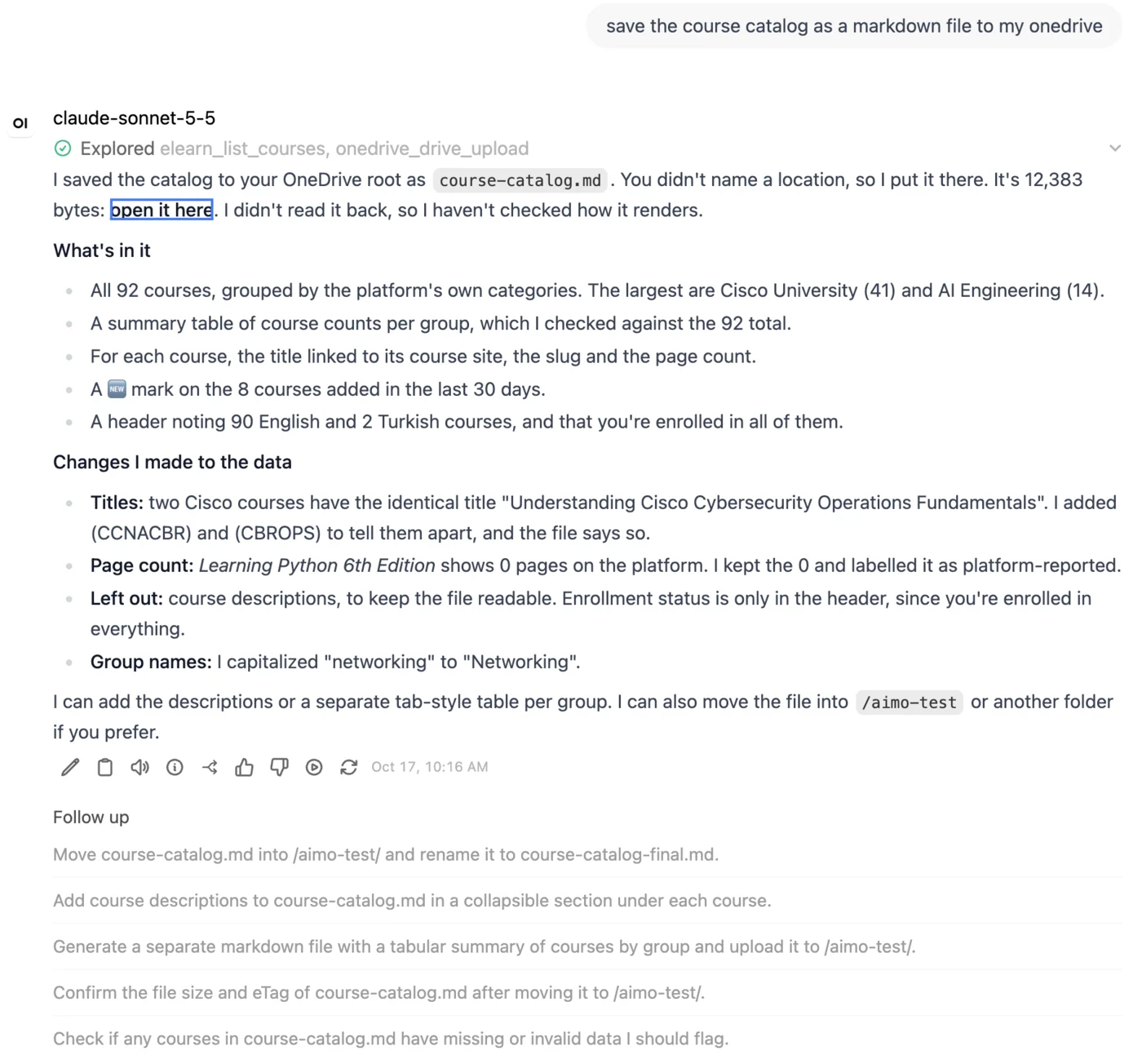
The answer took three Sonnet requests and two tool calls. The Follow up list under it came from one more request, to the task model:
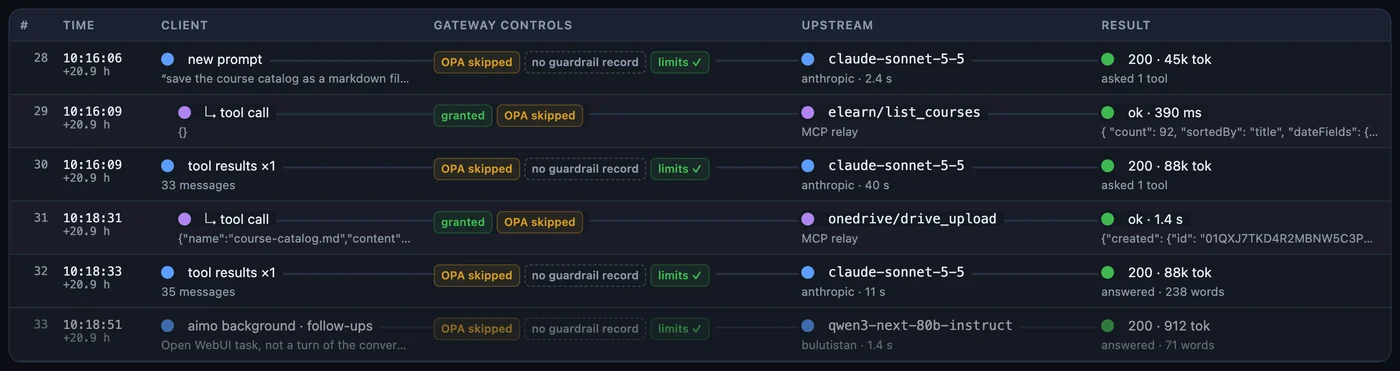
On the session’s flow in Activity, that last request is labelled aimo background · follow-ups: aimo made it on its own, not as a turn of the conversation.
- The Sonnet requests carried 45,204, 88,354 and 88,102 tokens: the whole conversation, the system instructions and the tool definitions.
- The follow-up request carried 912 tokens and took 1.4 seconds.
- This chat had started the day before, so its title and tags were written then, by the same task model (310 and 356 tokens).
The conversation’s text went to two providers: Anthropic for the answer, and the task model’s provider for the follow-ups.
Example 2: Sonnet answers, Haiku does the chores
The administrator then set External Task Model to claude-haiku-5-5 and the
person started a new chat, again with claude-sonnet-5-5. A new chat runs all three
jobs:
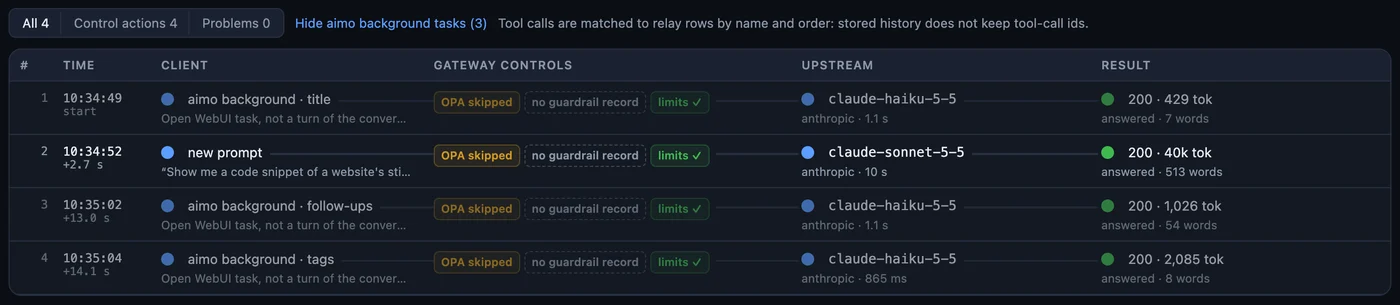
- Title: 429 tokens, 1.1 seconds. In this chat it was sent even before the answer.
- Answer: 39,702 tokens on Sonnet, 10 seconds.
- Follow-ups: 1,026 tokens, 1.1 seconds.
- Tags: 2,085 tokens, 0.9 seconds.
Every row now says anthropic. The conversation’s text went to one provider
instead of two.
The two examples side by side
| Example 1: open task model | Example 2: Haiku as task model | |
|---|---|---|
| Model that answers | claude-sonnet-5-5 | claude-sonnet-5-5 |
| Model for titles, follow-ups and tags | qwen3-next-80b-instruct | claude-haiku-5-5 |
| Providers that see the conversation | Two | One |
| Size of one follow-up request | 578 to 999 tokens | 1,026 tokens |
| Time for one follow-up | 1.0 to 1.5 seconds | 1.1 seconds |
| Cost of one background request | Under a tenth of a cent | Under a tenth of a cent |
| Rows on the Activity page | Same session, same person | Same session, same person |
In both examples the background requests were a small fraction of the cost of the answer, at the rates the reference installation billed on 17 October 2026: each one cost less than a tenth of a cent, while each Sonnet request in the screenshots above cost between 0.7 and 17 cents. What decides the choice is therefore not cost but where the conversation may go and how quickly the suggestions appear.
What does not change: the task model never writes the answer, the background requests are made as the same person, under the same session, and they appear and are billed on that person’s usage like any other request.
The VS Code extension has no task model
The aimo extension for VS Code talks to the same gateway, but it makes no background
requests. Every request in an extension session is the model you picked, and only
that model. Over the last 30 days the reference installation recorded 4,992 requests
from extension sessions and none of them was a ### Task: request.
- The title of an extension chat is your first message, cut to 70 characters. No model writes it.
- There are no suggested next messages and no tags.
- When a conversation grows too long, the extension shortens it itself: old tool output first, then whole old turns, then the bulk of the current turn. It does not ask a model to summarise.
- The model list in the extension shows chat models only. Changing the model in the middle of a chat keeps the same session, as in aimo.
aimo and the extension compared
| aimo | VS Code extension | |
|---|---|---|
| Model that answers | The one you pick | The one you pick |
| Extra model calls per chat | Title, follow-ups and tags, plus search queries when used | None |
| Who chooses the background model | The aimo administrator, once for everyone | Nobody; there is none |
| Chat title | Written by the task model | Your first message, up to 70 characters |
| Suggested next messages | Yes, after each answer | No |
| A conversation too long for the window | Summarised by a model (the chat’s own by default) | Shortened by the extension, without a model |
| Providers that see your text | The answer’s provider, plus the task model’s when it differs | Only the answer’s provider |
| One chat on the Activity page | One session | One session, tagged vscode |
| Gateway checks, limits and billing | Apply to every request, background ones included | Apply to every request |
Choosing a task model
- Pick a model that does not reason before it answers. A reasoning model spends its tokens thinking: in a test on the reference installation one took 13.6 and 31.6 seconds per follow-up list, where the two models above took about one second. An earlier reasoning task model returned empty titles.
- Decide where conversations may go. If a team’s chats must stay with one provider, use a task model from that provider, or Current Model, or switch the jobs off.
- Current Model costs the most. Every follow-up list is then written by the model the person picked, so a Sonnet chat pays Sonnet rates for its suggestions too.
- After any change, open one new chat and its session on Activity. The title, the answer, the follow-ups and the tags should appear as four rows, three of them on the task model you chose and labelled aimo background; reading the Activity page explains the view. If your installation sets the task model at deployment time, change it there as well, or the next deployment puts the old value back.