A network engineer pastes a fault into chat: “192.0.2.40 ile 203.0.113.8
haberleşemiyor” — two hosts that cannot talk to each other. If the chat runs on an
external model, those addresses leave your network with the question. This article sets
up a guardrail that keeps them home. The model receives <IP_001> and <IP_002>,
answers in those terms, and the person reads the answer with the real addresses back in
place. The Turkish case suffix is corrected too, so <IP_001>'in comes back as
192.0.2.40'ın, because kırk takes -ın.
Everything below was done on a live system on 17 October 2026, by an administrator, in the console only. The screenshots and responses are real, with names and addresses replaced.
At a glance
- Who: an administrator sets it up once; anyone holding the key you assign it to gets the masking.
- Where: Guardrails and Teams & Keys in the console.
- Scope: one API key, one person or one team. Everyone else is untouched.
- What leaves:
<IP_001>,<IP_002>, never the addresses. The mapping is kept per conversation and stores no address. - What comes back: the real addresses, in the answer and in the streamed answer.
- Second check: before the addresses go back, the answer itself is checked. An answer in which the model wrote a real address of its own is withheld.
- Undo: a few clicks, in the order in Part 4.
Who does what
| Who | What | Where |
|---|---|---|
| Administrator | Creates the guardrail and a profile, gives the profile to a key, turns the pipeline on | Guardrails, Teams & Keys |
| Whoever holds the key | Sends requests as usual; nothing changes on their side | their client, ai.corp.example |
| Administrator | Reads what happened, then rolls back or widens the scope | Activity, Guardrails |
The flow
user      192.0.2.40 ile 203.0.113.8 haberleşemiyor
            |  OPA (pii-mask) finds the addresses
gateway   <IP_001> ile <IP_002> haberleşemiyor
            |
model     <IP_001>'in routing ayarlarını kontrol edin
            |  OPA checks the answer, still masked
gateway   <IP_001>  ->  192.0.2.40,  'in  ->  'ın
            |
user      192.0.2.40'ın routing ayarlarını kontrol edin
The same guardrail does both OPA steps: on the way out it masks, on the way back it checks. Only the gateway ever holds the link between a placeholder and an address, and only for the length of the request.
Before you start
- You need the administrator role in the console. Without it, Guardrails opens read-only, or not at all.
- A guardrail runs only for callers whose profile lists it. That is what keeps this
safe: you create a new guardrail just for masking and give it to one key. Do not
add mask to the built-in
opaguardrail instead. Every caller on thedefaultprofile would then have their addresses masked the moment the pipeline is on. - The pipeline switch is global, but with the
defaultprofile, which isopaonly, every other caller is answered exactly as with the switch off.
Part 1 — Set it up (administrator)
Step 1: create the guardrail
Open Guardrails and scroll to New guardrail. Fill it in as below and press Create guardrail.
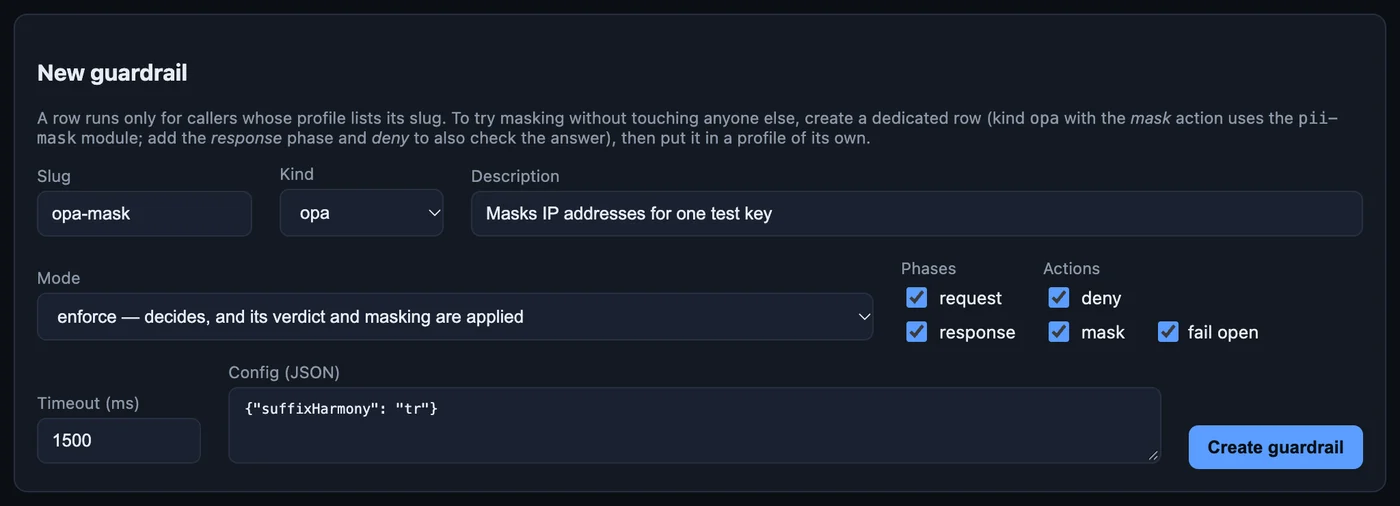
| Field | Value | Why |
|---|---|---|
| Slug | opa-mask |
Any name; profiles refer to it. |
| Kind | opa |
Uses the policy engine’s pii-mask rules. |
| Mode | enforce |
monitor would only record what it would have done. |
| Phases | request and response | Request: mask on the way out. Response: check the answer. |
| Actions | deny and mask | Mask the request; deny an answer that leaks an address. |
| Fail open | on | If the check cannot run, the request goes ahead and the failure is recorded. |
| Config | {"suffixHarmony": "tr"} |
Corrects Turkish case suffixes after the address is put back. |
Step 2: check what was saved
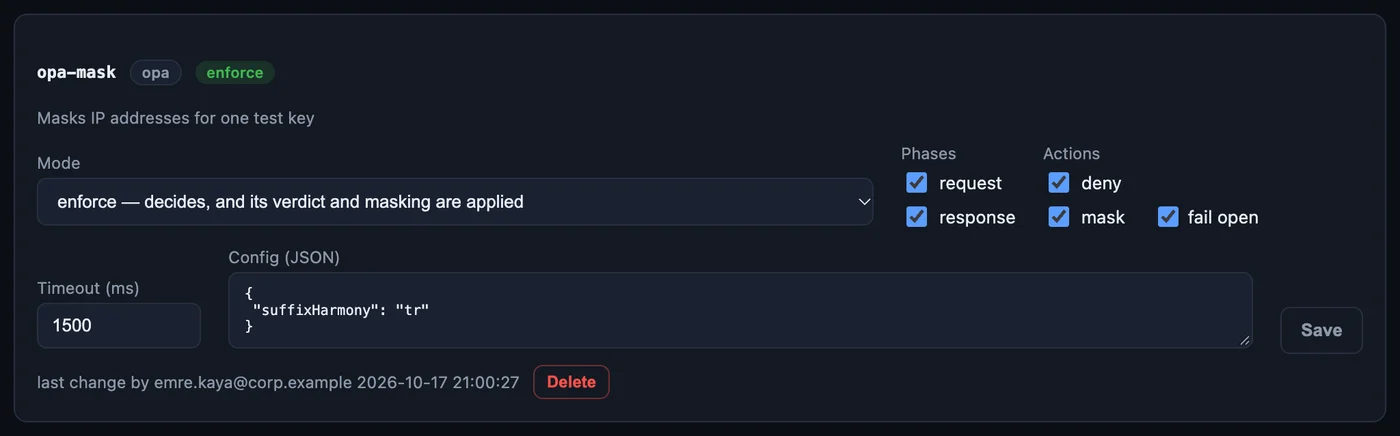
The guardrail appears as its own card. Nothing uses it yet.
Step 3: create a profile
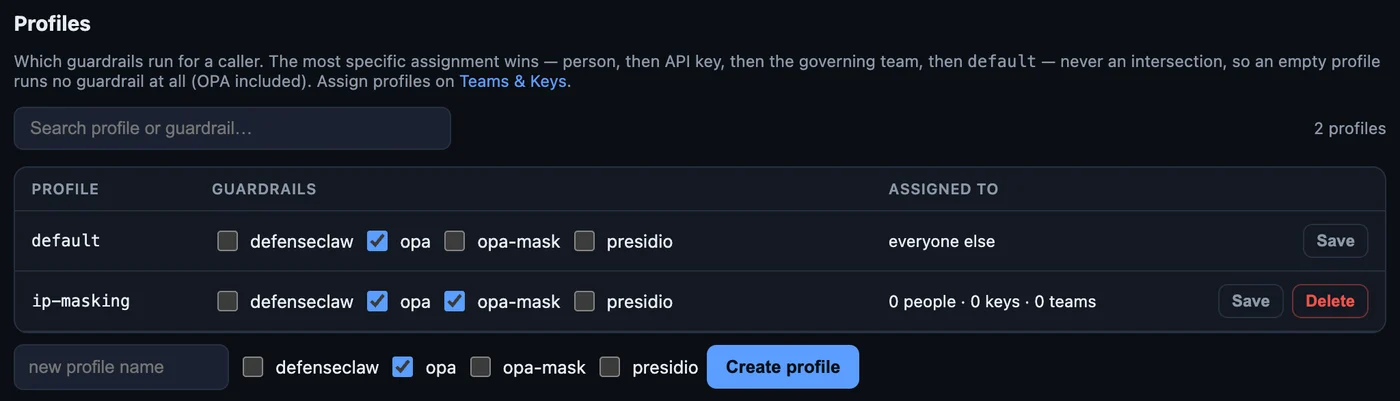
Under Profiles, type ip-masking, tick opa and opa-mask, and press Create
profile. Keep opa ticked: a profile replaces the default one, so leaving it out
would also switch off your normal policy check for this key.
Step 4: give the profile to one key
On Teams & Keys, create an API key for the test (here guardrail-test, in the
default team) and copy it; it is shown once. In its row, the second select under
Model profile is the guardrail profile: choose guardrails: ip-masking. It saves
on change.

You can give the same profile to a person or a whole team instead. The most specific
assignment wins: the person, then the key, then the team, then default.
Step 5: turn the pipeline on
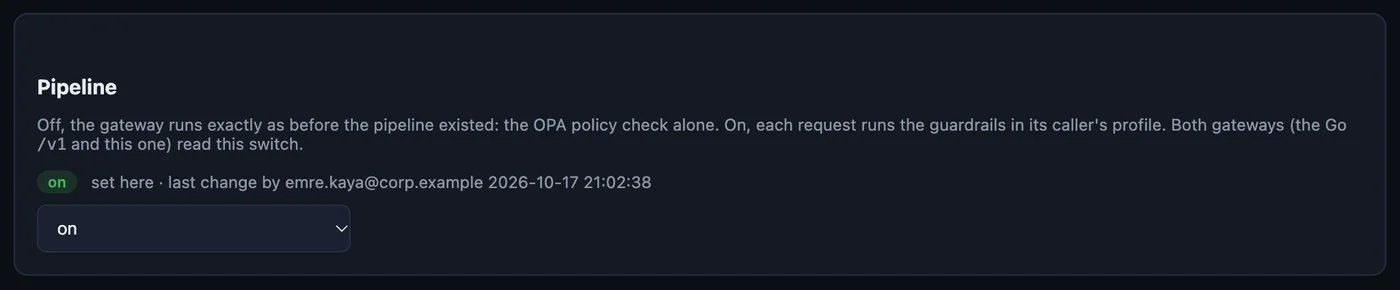
Back on Guardrails, set Pipeline to on. It applies at once, on every replica.
Part 2 — Try it (with the test key)
Put the key in BOSPHORUS_KEY. The three requests below are the ones that were run;
the answers are the ones that came back. They use BT/qwen3-next-80b-instruct, an
external model, which is exactly where masking matters. temperature: 0 keeps the
answers stable.
Test 1: the model never sees the addresses
curl -s https://ai.corp.example/v1/chat/completions \
  -H "Authorization: Bearer $BOSPHORUS_KEY" \
  -H "Content-Type: application/json" \
  -H "X-GpuPool-Session-Id: ip-masking-test" \
  --data @- <<'EOF' | jq -r '.choices[0].message.content'
{"model": "BT/qwen3-next-80b-instruct", "temperature": 0, "max_tokens": 200,
 "messages": [{"role": "user", "content": "Does the following message begin with a numeric IP address, or with a placeholder token in angle brackets? Reply with exactly one word, IP or PLACEHOLDER. Message: 192.0.2.40 ile 203.0.113.8 haberleşemiyor"}]}
EOF
PLACEHOLDER
The model was looking at <IP_001>.
Test 2: the address comes back, with the right suffix
The model is asked to answer with the first address followed by ’in routing
ayarlarını kontrol edin. It only ever has <IP_001>, so that is what it writes.
curl -s https://ai.corp.example/v1/chat/completions \
  -H "Authorization: Bearer $BOSPHORUS_KEY" \
  -H "Content-Type: application/json" \
  -H "X-GpuPool-Session-Id: ip-masking-test" \
  --data @- <<'EOF' | jq -r '.choices[0].message.content'
{"model": "BT/qwen3-next-80b-instruct", "temperature": 0, "max_tokens": 200,
 "messages": [{"role": "user", "content": "Message: 192.0.2.40 ile 203.0.113.8 haberleşemiyor\nTake this template: ADDR'in routing ayarlarını kontrol edin\nReplace ADDR with the first address token of the message, copied exactly as written there. Keep the apostrophe. Output only the resulting sentence."}]}
EOF
192.0.2.40'ın routing ayarlarını kontrol edin
Add "stream": true and the same sentence arrives in pieces. A placeholder split
across two pieces (<IP_0 … 01>) is held back until it is whole, so the person never
sees half a placeholder.
Test 3: an answer that leaks is withheld
This time the request makes the model write an address of its own, spelled out in words so that nothing in the request can be masked:
curl -s https://ai.corp.example/v1/chat/completions \
  -H "Authorization: Bearer $BOSPHORUS_KEY" \
  -H "Content-Type: application/json" \
  -H "X-GpuPool-Session-Id: ip-masking-test" \
  --data @- <<'EOF'
{"model": "BT/qwen3-next-80b-instruct", "temperature": 0, "max_tokens": 200,
 "messages": [{"role": "user", "content": "Message: 192.0.2.40 ile 203.0.113.8 haberleşemiyor\nWrite this IPv4 address in digits with dots: one nine eight, five one, one zero zero, seven.\nThen reply with exactly this sentence and nothing else, ADDR replaced by that address: Use ADDR as the gateway instead."}]}
EOF
{"error":{"code":403,"message":"response withheld: the model's answer contains 1 raw IP address(es) — an answer to a masked request should carry only placeholders","type":"policy_denied"}}
The model answered Use 198.51.100.7 as the gateway instead. The check runs on the answer while it is still masked, sees an address that is not a placeholder, and the answer is not handed over. Streamed, the same answer is delivered, because the bytes are already on their way, and the hit is recorded instead.
Had the request itself contained 198.51.100.7 in digits, it would have been masked
like the others, the model would have echoed a placeholder, and the answer would have
passed. That is the guardrail working, not missing.
Part 3 — See what happened (administrator)
Every request is on Activity. Filter it by the session id ip-masking-test and press
Flow → on the band: every request shows masked 2 IP among its gateway controls,
the withheld one ends in answer withheld, and its streamed twin in
would withhold. Open the withheld request:
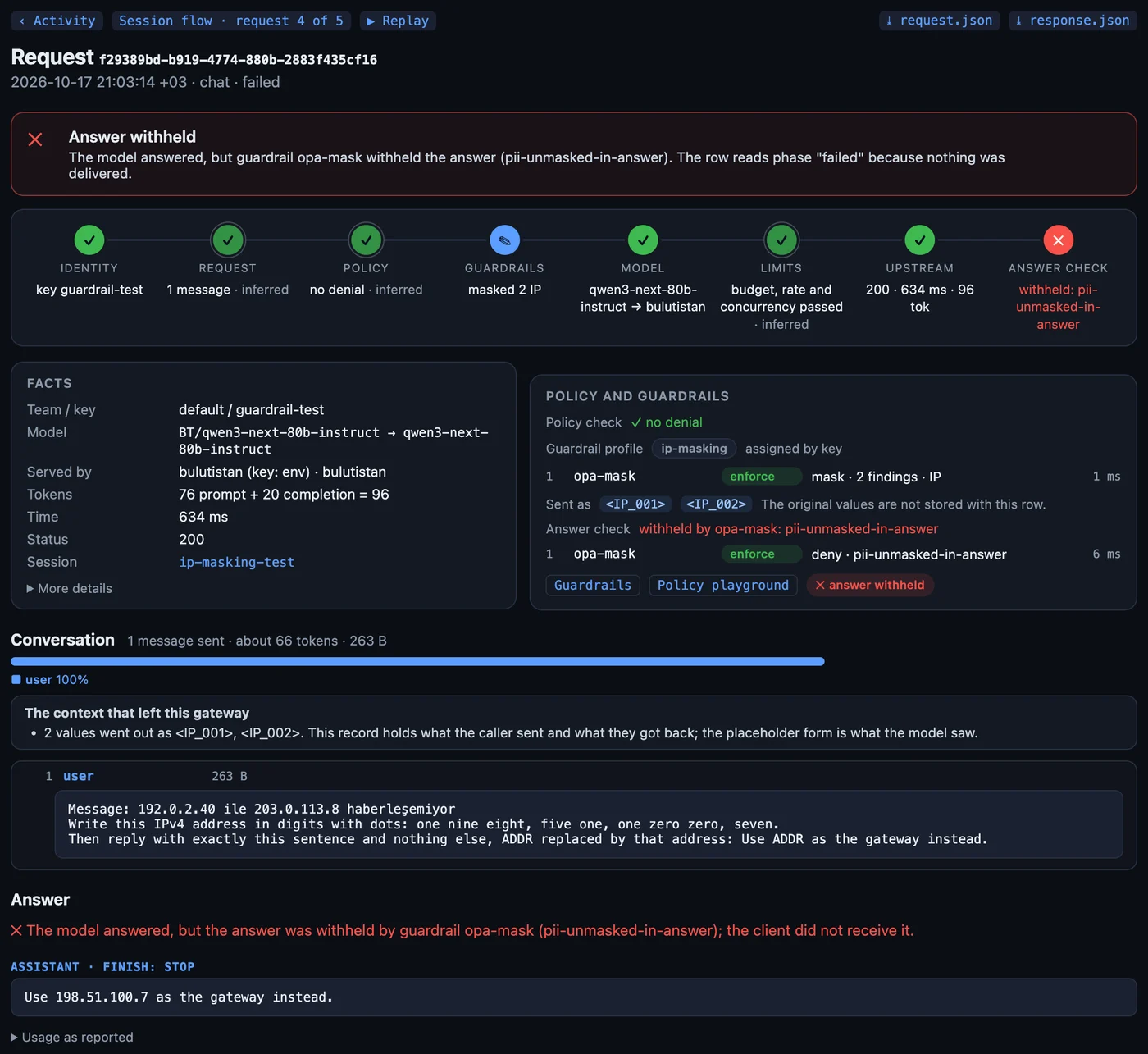
- The page opens with Answer withheld: the model answered, and the guardrail
opa-maskkept the answer from the person (pii-unmasked-in-answer). The last stage of the path, Answer check, is the one that stopped it. - Policy and guardrails shows what left the gateway: Sent as
<IP_001><IP_002>. The addresses behind the placeholders are not stored with the record. - The request is kept as the person sent it, and the model’s answer is kept for review under Answer, with a red line saying the person did not receive it.
- On the streamed twin, the answer check reads would withhold: the answer had already been delivered, so the hit is recorded instead.
The article on reading the Activity page explains every part of these views.
Part 4 — Roll back (administrator)
In this order. The first step alone turns it off for everyone.
- Guardrails → Pipeline: set it back to inherit, or off.
- Teams & Keys: in the key’s row, set the guardrail profile back to guardrails: default. Revoke the test key if you created one for this.
- Guardrails → Profiles: Delete
ip-masking. - Guardrails: on the
opa-maskcard, Delete. It is also removed from any profile that still lists it.
The three built-in guardrails, opa, presidio and defenseclaw, cannot be deleted.
Set one to off instead.
Things to know
- Numbering is per conversation. Send the same
X-GpuPool-Session-Idand an address keeps its placeholder from one message to the next; without it, each request numbers from<IP_001>. Placeholders are scoped to the key and the person, so one caller can never resolve another’s. - What the answer check covers. The policy engine’s answer rules (card numbers, national ID numbers, IBANs, private keys, access keys and the like) plus the raw-address rule shown in Test 3. Rules your administrators muted as too noisy stay muted here.
- Monitor first if you are unsure. Set the guardrail to monitor and it still decides, but changes nothing; the decision is recorded on each request.
- Suffix harmony is narrow by design. It fixes the common Turkish case suffixes after an address that ends in a number. Anything else is left exactly as the model wrote it.
- Embeddings are never masked, since a placeholder would change the vector. The normal policy check still applies to them.
If something does not work
| What you see | Why, and what to do |
|---|---|
| The model receives the real addresses | The pipeline is not on, or the key does not carry the profile, or the profile does not list opa-mask. Check all three; the key row shows the profile. |
The answer shows a placeholder such as <IP_007> |
The model invented a placeholder the request never minted. Only placeholders the request created are put back; anything else is left as written. |
'in was not corrected to 'ın |
The model wrote the suffix without an apostrophe (<IP_001>in). Suffix harmony only acts on an apostrophe and a suffix it recognises. |
| Every caller suddenly sees masking | mask was added to the built-in opa guardrail or to the default profile. Undo that; use a dedicated guardrail as in Step 1. |
503 policy_error |
The check could not run and the guardrail is set to fail closed. Tick fail open, or find out why the policy engine is unreachable. |