Two releases of the aimo extension for VS Code went out this week: 1.4.0 on 5 November 2026 and 1.4.1 on 6 November. 1.4.0 is the larger one: the extension can now run on your own provider API key, and it can run tool servers on your own machine, under the platform’s checks while you are signed in. 1.4.1 fixes how the model learns about those servers.
Both are on the Visual Studio Marketplace and on the aimo for VS Code page. The screenshots below come from the real runs described in Chrome DevTools in aimo for VS Code.
Before you start: most of what is new works with a Bosphorus installation and a sign-in on it. If you would like to try it, contact Morten or write to iletisim@morten.com.tr. Direct mode needs only an API key from a model provider.
Who does what
| What | Who | Where |
|---|---|---|
| Update to 1.4.1 | Each person | VS Code, Extensions view |
| Use your own API key (direct mode) | Each person | VS Code |
| Run tool servers on your machine | Each person | VS Code, user settings |
| Keep and share a traffic log of those servers | Each person | VS Code, Tool Servers |
| Register the recipes people may run | Administrator | Console, /mcp |
| Allow or refuse people’s own tool servers | Administrator | Console, /policies and /keys |
| Read an uploaded traffic log | The person who uploaded it, administrators | Console, /activity |
Update
A copy installed from the Marketplace updates itself. To check, open the Extensions view
(Ctrl+Shift+X, on macOS Cmd+Shift+X) and look at aimo’s version. To install from the
download instead, take the .vsix from the aimo for VS Code
page and choose Install from VSIX… in the … menu at the top of that view.
1.4.1 needs nothing from the platform that 1.4.0 did not. Tool servers on your machine need an installation that supports them: an older one answers this platform does not support local tools yet, and nothing runs.
Part A: what is new for each person
A1. Your own API key: direct mode
aimo now also runs without a Bosphorus installation, on your own key from OpenRouter, Hugging Face, Evren, Novita, Cerebras or any OpenAI-compatible endpoint, a model server on your own computer included. Start it with AIMO: Use Your Own Provider API Key….
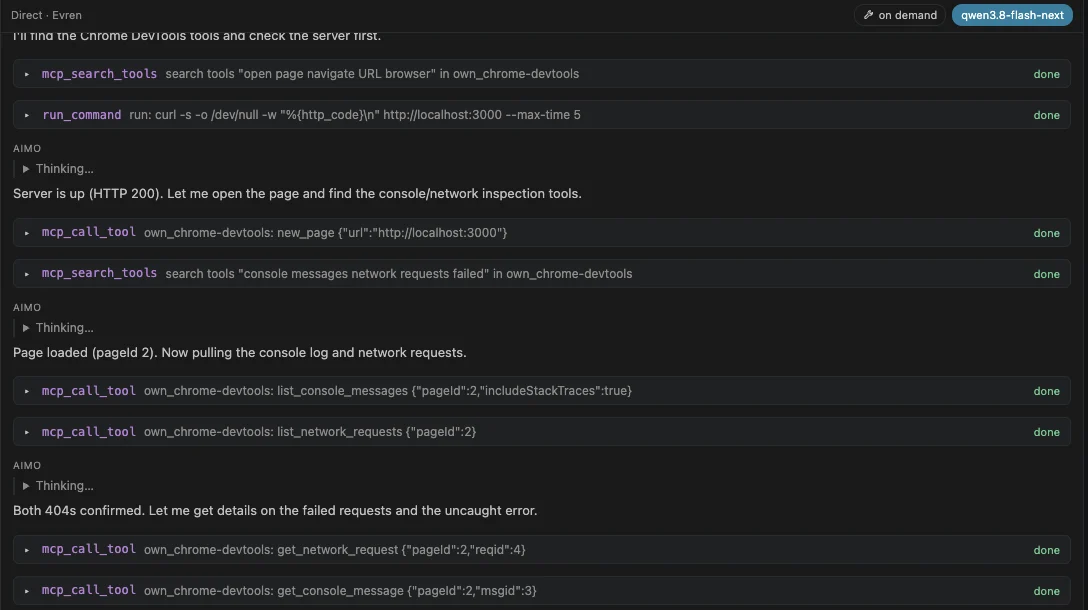
- What it gives up. Your chats go straight to that provider. The platform’s policy checks, quotas, audit trail, curated models, tool servers and vault do not apply, and aimo shows you that list before it sends anything.
- Your key. It is checked without spending a token, kept in VS Code’s secret storage and sent only to its own provider. aimo never picks a model for you.
- One or the other. Choosing direct mode signs you out of the platform on that machine, so a person is never governed and ungoverned at once. AIMO: Switch Connection (Platform or Your Own Key)… goes back. Your organisation’s gateway stays the default.
A2. A chat asks before it moves
When you continue a chat somewhere new (from the platform to a provider, back again, or to another provider), aimo asks first and names where the chat’s whole history would go.
A3. Tool servers on your own machine
aimo can now run tool servers beside VS Code, where they can reach what a server inside the
platform cannot, such as a page on http://localhost:
- Recipes your organisation registers: Chrome DevTools and Playwright, which drive a browser on your machine, and CodeGraph, which answers questions about your repository from an index on your machine, only for the folders you index with AIMO: Index This Repository with CodeGraph.
- Your own servers in
aimo.mcp.local.servers: a command, or anhttps://address. Their secrets come from AIMO: Set Local Server Secret or your vault, never from plain text in settings.
The switch is aimo.mcp.local.enabled, off by default. Each server asks before it first runs
on your machine, showing exactly what it will start, and asks again whenever that changes:
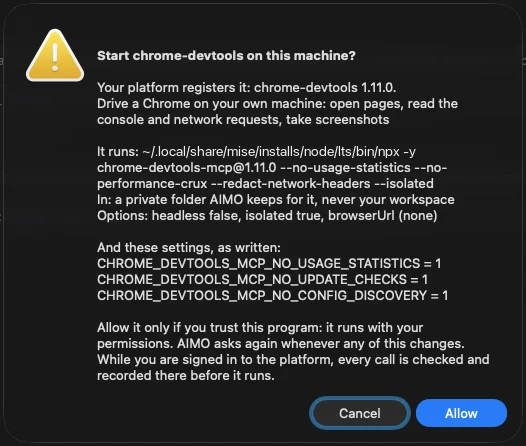
While you are signed in, the platform checks and records every call before it runs; when it cannot, the call does not run. Nothing local runs in VS Code’s Restricted Mode. A call that can change something waits for you, and for a server on your machine the approval card shows every argument of the call, where it used to show the first 120 characters:
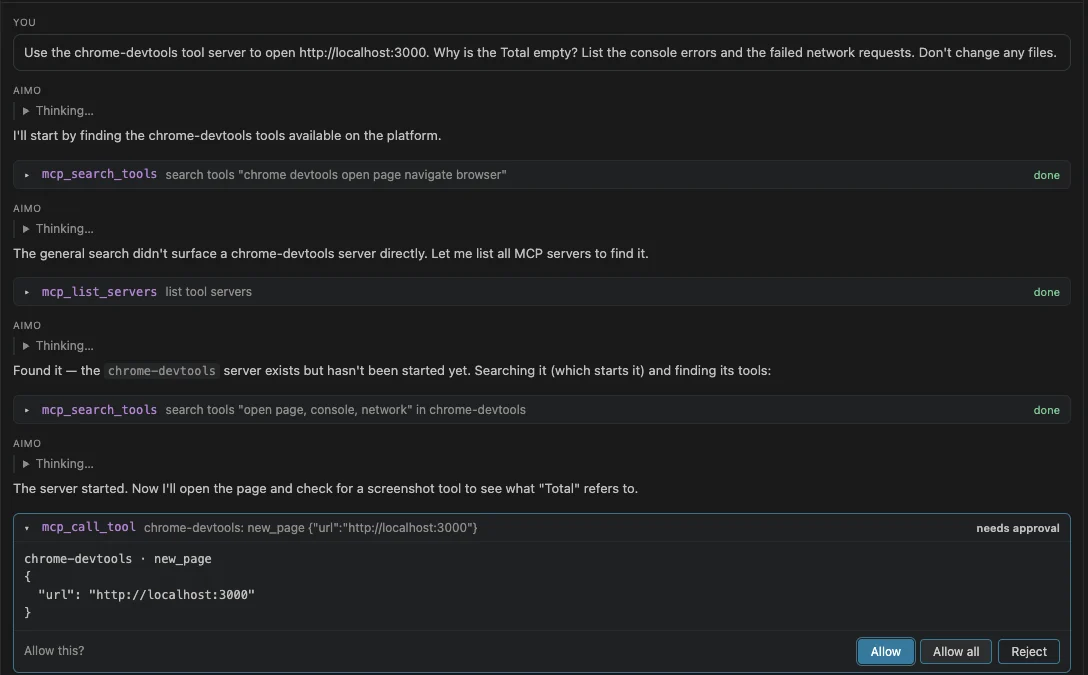
The whole procedure, on the platform and in direct mode, is in Chrome DevTools in aimo for VS Code.
A4. The MCP traffic log
aimo can keep an encrypted, sealed log of what passes between it and the tool servers on your machine: every message both ways, their starts, stops and error output, the platform’s check and your approvals. It is off by default; AIMO: Turn the MCP Traffic Log On or Off asks first, on each machine.
- What is masked. Values aimo knows to be secret are masked before anything is written, and so are credential-shaped headers, cookies, tokens and the values in addresses. A secret that a tool server shows and aimo does not know (a website’s own cookies, what a page contains) is recorded as the server sent it.
- Nothing leaves your machine by itself. You upload a segment yourself, from MCP traffic log in Tool Servers. aimo names what goes where and asks first, and an upload goes only to your organisation’s gateway. AIMO: Show My Uploaded MCP Traffic Logs lists yours. In direct mode the log never leaves the machine.
A5. Changes you may notice
- A tool no longer runs twice after an error that mentions a “session”. From 1.0.0 to 1.3.4, aimo started a new session and sent the same call again after any such error, also to your organisation’s tool servers. Now a call is sent again only when the server said the session itself is unknown and nothing ran, and only once.
- More variables can no longer come from the vault through
aimo.vault.env: names starting withNPM_,YARN_,NODE_,PUPPETEER_orPLAYWRIGHT_, among others, such asNPM_TOKEN, decide what a process installs, loads or trusts. An entry naming one is ignored, and AIMO: Show Log says why; give the variable another name.
Part B: what administrators do
B1. Register the recipes people may run
On /mcp, the card Register a local server (runs in the VS Code extension) registers
Chrome DevTools, Playwright or CodeGraph. You choose the recipe, a name, a description and how
much of each result the audit trail keeps; the command that runs ships inside the extension and
is never typed on the console. Team scope and access then apply as for any server. The fields are
in Chrome DevTools in aimo for VS Code.
B2. Allow or refuse people’s own tool servers
The banner Own tool servers in VS Code on /policies says whether people may run servers
they define themselves while signed in. It is allowed by default, and Do not allow /
Allow switches it. A team can override it on its card on /keys: own tool servers:
inherit, allowed or not allowed. Recipes you register are not affected; every call to any
local server is still checked first.
B3. Read an uploaded traffic log
An uploaded log shows on /activity, on the page of each call it recorded (Local trace),
and on a page of its own. Only the person who uploaded it and administrators can open it. The
calls the platform checked are matched against its own records, and the uploader or an
administrator can withdraw the log, which deletes its stored records for good. An installation
that does not accept traffic logs tells the person this platform does not accept MCP traffic
logs — they stay on this machine.
1.4.1: the model is told about the servers on your machine
The model is given a short list of the tool servers it can use, cut at a fixed size. In 1.4.0 the servers on your own machine came after every platform server, so on an installation with many of them they were never named, and a request for Chrome DevTools could be answered without it. From 1.4.1 they come first, with a note on how to start one that has not run yet. Naming the server in your request is still the surest way to make the model use it.