Document administration
The dashboard where curators build aimo's document collections: who it is for, how it works with aimo, a quick start, and where each part is documented.
Checked against the running product on 22 November 2026
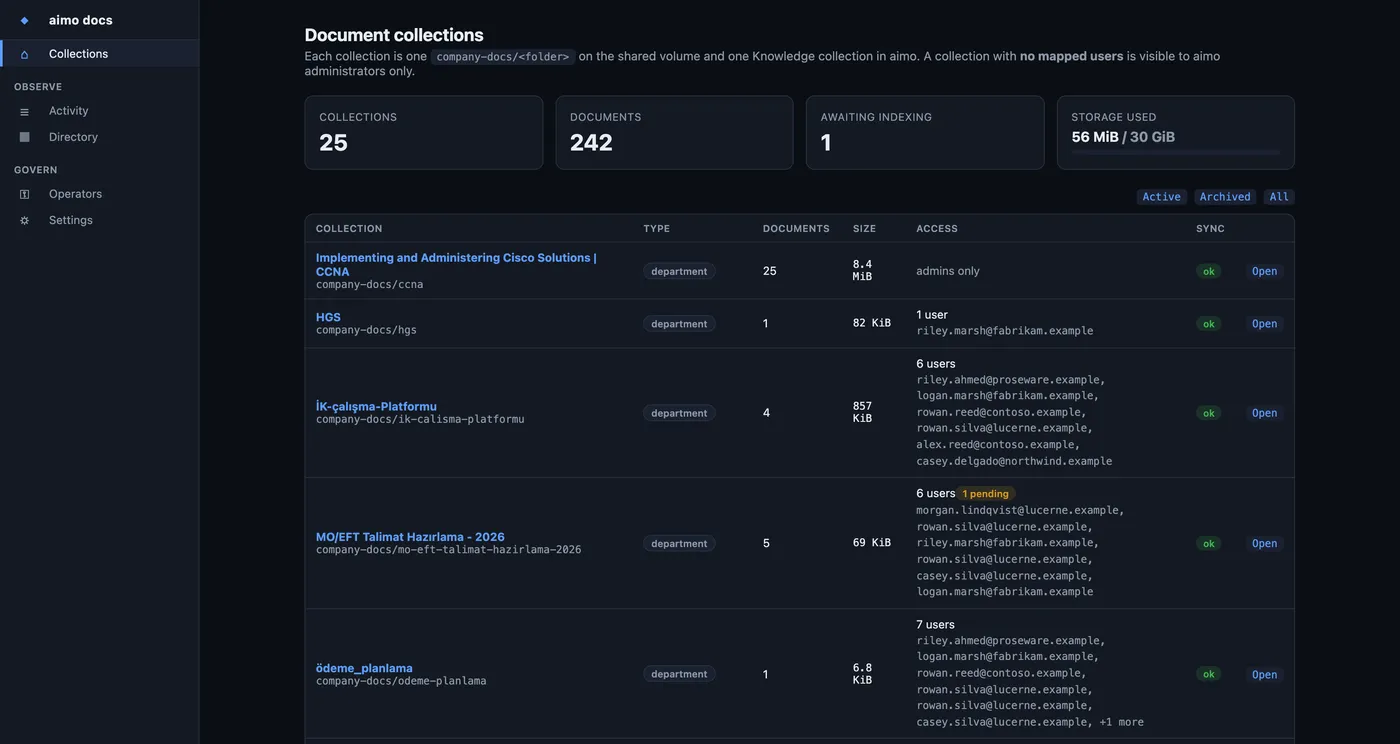
The document administration dashboard is where your organisation decides which documents people can chat with in aimo. A curator creates a collection, uploads its files and chooses who may read it; the dashboard then sets aimo up to match. In its own sidebar the dashboard calls itself aimo docs.
What it does, and what it does not
- It sets aimo up for you. For each collection it creates the collection in aimo, a reader group, the group’s members and the read grant, and keeps them in line with what you choose here. You do not touch aimo’s own administration for any of this.
- It keeps your files first. An upload is stored on the dashboard’s own storage before anything else happens. The slow part, reading and indexing the document, runs in the background, so a large upload never holds up the person who made it.
- It is not where people read documents. The dashboard has no search and no download. People use a collection in an aimo chat — see Company documents.
- It does not decide which models may answer. The rule that keeps document passages on your own hardware, like every other check on a chat, belongs to the platform — see In aimo.
Who it is for
| Reader | What these pages give you |
|---|---|
| Curators | Creating collections, uploading and indexing files, and deciding who reads each one |
| Dashboard administrators | The roles, the connection to aimo and the settings the dashboard shows |
| aimo and platform administrators | How the dashboard’s collections and groups appear in aimo, and what not to change there |
Everyone who can sign in may look; only curators and administrators change anything — see Sign-in and roles.
How it fits with aimo
In aimo, a document collection is readable by the groups it is granted to. A group gets its
members in one of two ways: from a role or group in your identity provider, or from this
dashboard, where a curator names the people. Every collection made here gets a group of its own
in aimo, named after the collection with the prefix rag-, and only the people you map onto it
are in that group. Collections granted to identity-provider groups are set up in aimo by your
platform operator; they do not appear here, and the dashboard never changes them.
Reading a document is aimo’s own work: its text is extracted, with OCR for scanned pages, split into passages and indexed through the platform’s gateway. The dashboard hands aimo one document at a time and shows you how far each one has got.
Quick start
- Open the dashboard at your organisation’s address for it, for example
https://rag.corp.example, and sign in with your work account. - Ask for the curator role if you do not have it. A first sign-in makes you a Viewer, who can only look.
- Create a collection. On Collections, under New collection, enter a Name, choose a Type and press Create collection — see Collections.
- Upload files. Open the collection, choose files under Add documents and press
Upload. Each file shows its progress in the Status column until it reads
ready— see Uploading and indexing. - Choose the readers. Under Change who has access, tick the people who should read it and press Save access list — see The directory.
- Tell them where to find it. In an aimo chat they type
#and pick the collection by its folder name — see In aimo.
Until you save an access list, a new collection is visible to aimo administrators only.
This documentation
| Section | Pages |
|---|---|
| Get started | This page and Sign-in and roles |
| Collections and files | Collections, Uploading and indexing, Who sees a collection and The directory |
| Reference | Activity, Settings, In aimo and Troubleshooting |
Some of what you see depends on your installation: which identity provider you sign in with, whether the people picker can read your directory, and which embedding model indexes the documents. Each page says so where it matters. If your organisation does not run Bosphorus yet, see the workspaces or contact us.