Runs, files and memory
The Runs list and the run page, replying to a run, the files an agent makes and how to get them, and what an agent remembers from one run to the next.
Checked against the running product on 22 November 2026
Every run leaves a record you can read, reply to and download from. This page covers the Runs list, the run page, the files a run makes, and the memory an agent keeps between runs.
The Runs list
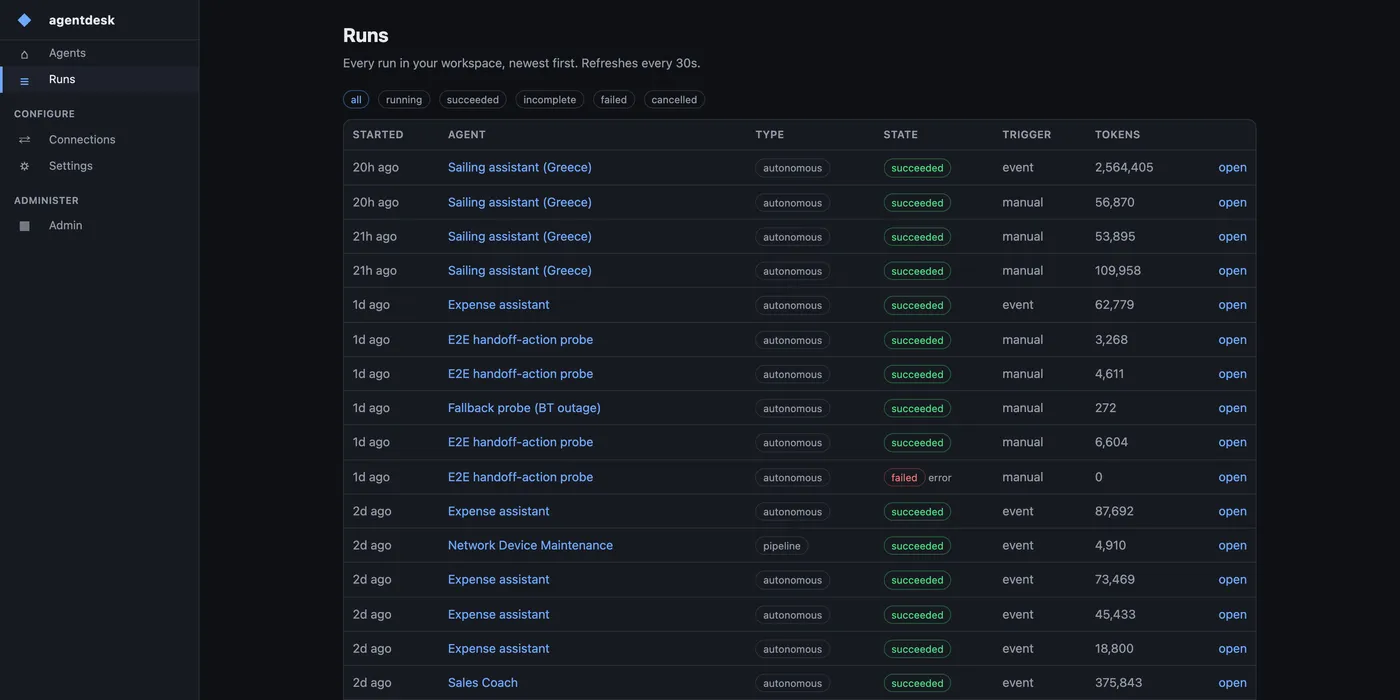
Runs, in the sidebar, lists every run in your workspace, newest first, 50 to a page. It refreshes
itself every 30 seconds, and every 5 while something is running. The chips above it filter by state —
all, running, succeeded, incomplete, failed, cancelled — and clicking an
agent’s name shows only that agent’s runs. Trigger says what started each one: manual,
schedule, or event for a chat message, a ticket or a handoff.
The run page
A run reads as a conversation, because that is what it is: your message, the agent’s replies and, between them, what it did.
- Activity lines — ⚙ searched the web for “…”, ⚙ ran code — sit between the messages and open to show the raw result. They are folded so the conversation stays readable.
- It updates live. The answer streams in as the agent writes it; there is nothing to reload.
- You can reply. The box at the foot serves both cases without you having to know which you are in: if the agent asked you a question, your message answers it; if the run has finished, your message continues it as a new turn. Either way it is the same run, so the agent keeps everything above, and the platform still sees one piece of work. Up to 8,000 characters of a follow-up are kept. A pipeline run cannot be replied to — start a new run to change the input.
- A concierge’s question about where a request should go appears as buttons: Start a fresh …, Continue #… for each earlier run it could continue instead, and Drop it. It is the same question the bot asks in Teams; answer in either place.
- Waiting on a colleague, the page names who and what was asked, with Take it back.
At the top, Cancel stops a run that is queued, running or waiting; Run again starts a new run of the agent’s current version; and, where you have a Teams chat with the bot, Talk to this run in Teams binds that chat to this run, so your next message there continues it (it then reads Teams: bound ✓ — unbind). A banner says when a run was made with the shared service key instead of yours, and a red one gives the reason a run failed.
The details table holds the Model, the Instance — # and the first eight characters of the
run’s id, which you can use in Teams — the Session id the platform files the run under, the
Tags, the Tokens (in, out and tool calls), the Timing and, when it ended early, why it
Stopped.
Step detail, folded at the foot, is the view for working out why a run did what it did: every
step with its tokens, duration, the serving node and the gateway request id. Notes there are the
runtime talking to you — a model it moved off, a turn it discarded, a tool that was unavailable, and
for a model-routed agent a model-router entry per request.
Code the agent writes in its answer gets a Copy and a Download button, with a file name taken from the code block or its language.
Files an agent makes
When an agent draws a chart, builds a spreadsheet or writes a report — in the code sandbox, or because a tool returned an image — the file appears in a Files panel on the run page, while the agent is still working. Each file has Download, and most have Preview: images show, and text, CSV, Markdown and JSON open in place (an SVG image is offered as a download only). With more than one file, Download all (…) as .zip takes them together.
- They outlive the sandbox. Files are copied out of the agent’s working environment and kept with the run, so last Tuesday’s report is still downloadable today.
- Tools can make files too. An image a tool server returns — a route map, a chart — is saved to
the panel under a
tools/name. The agent is told only the file’s name, never its contents; up to four images, and 8 MB in all, are taken from one tool call. - Limits: 10 MB per file and 50 MB per run are kept, as shipped. A file over them still appears in the list, marked too large to keep or over the run limit, so you can see the agent made it.
Ask for a file, not for the contents: “write the report to report.md” gets you a download;
“print the report” gets you a wall of text in the conversation. The agent is told this too, but
saying it in the instructions helps.
What an agent remembers
Each agent has its own memory. Two agents never share one, and a new agent — even one created from the same template — starts empty, which is the simplest way to get a clean slate.
- The agent writes memories deliberately, with
builtin__memory_write, when it decides something is worth carrying forward. Nothing is summarised and stored behind your back. - Recall is automatic for autonomous agents. At the start of every run, the notes most relevant to
what you asked are put in front of the agent, marked as recollection that may be out of date. A
pipeline is not given memories on its own — a fixed chain that varied with what it had learned would
not be fixed — though a step can search them with
builtin__memory_search. - You can read, add and delete them. What it remembers, on the agent’s page, lists the 200 most recently used notes, who wrote each — you or the agent — and how often it has been used. Tell it something to remember adds one; Forget deletes one; Forget everything deletes them all. A note cannot be edited in place: delete it and add the corrected one.
An agent keeps up to 500 notes of up to 2,000 characters each; past that, the least recently used makes room. At most 20 notes, and 4,000 characters, are recalled into one run, ranked by how well they match the request, with recency breaking ties. Memory is not part of an agent’s version, and deleting the agent deletes it.