Models
Choosing a model in aimo: what the picker lists and what the prefixes mean, the model profile that decides what you may use, and the task model.
Checked against the running product on 25 November 2026
The model picker at the top of a chat decides which model answers your next message. This page explains what the list shows, what decides which of those models you may use, and the second model aimo uses in the background for titles and suggestions.
Choosing a model
Click the model’s name at the top of the chat and pick another. You can change model in the middle of a conversation: the next answer comes from the new model, which receives the whole conversation so far.
A new chat may open on a model your administrator suggests for you, your team or everyone. It is a suggestion only. If you choose a default of your own in aimo, it is kept for as long as your profile still allows that model.
What the list shows
The list comes from the gateway, and it is the same for everyone: it shows the platform’s whole chat catalogue, not only the models you may use. Whether you may use a model is decided when you send a message, and a model you may not use answers with a message saying so rather than being hidden.
A model’s id says where it runs:
| In the list | Where it runs |
|---|---|
| An id with no prefix, such as a Qwen or Gemma model | Your organisation’s own pool of model servers: the pool models |
OP/… |
Your organisation’s own GPU servers |
claude-… |
Anthropic, on your own Anthropic key or the organisation’s |
claude-auto |
The first Claude model in the order your administrator set |
HF/…, OR/…, BT/…, MS/…, CB/…, NV/… |
External providers: Hugging Face, OpenRouter, Bulutistan, Microsoft Foundry, Cerebras and Novita |
EV/… |
Evren, an external provider, on your own Evren key only |
aimo-help |
The platform’s help assistant — see aimo-help |
Which of these you see depends on what your administrator has registered; an installation need not use every provider.
- Claude models appear once an Anthropic key exists on the platform, the organisation’s or your own. Which Claude models are listed is your administrator’s choice; your own key adds none — see Your own Anthropic key.
EV/models need your own Evren key. The platform holds none. Until you save yours on the console’s My variables page, under Evren keys, anEV/model answers with a message telling you where to add it. The Evren model cookbook explains the key.- The list holds chat models only. Models for speech, embeddings and other kinds of work are served elsewhere and do not appear.
- Which models read images or call tools varies. Ask aimo-help “which models can read a screenshot?”: it answers from the live list of your models.
Your model profile
Your administrator can limit which models a person may use with a model profile, a list of allowed models. Profiles can be assigned to a person, to the workspace’s key and to a team, and the most specific one applies: yours, else the workspace key’s, else your team’s, else the platform default. A profile is never combined with another, and an empty profile allows every model.
Sending to a model your profile does not allow returns an answer that begins like this, with
your installation’s model and profile names, and nothing is sent to any model:
⛔ Blocked by pool policy: model "claude-opus-5-5" is not allowed by model profile "standard".
Pick another model, or ask your administrator to widen your profile. aimo-help is always
available, whatever your profile says.
Models and company documents
Where your administrator has policy checks switched on for aimo, a conversation that carries
passages from company documents may be answered only by models on your own hardware: your
organisation’s pool models, and OP/ models where your installation treats them as internal.
Switching such a chat to an external model returns a ⛔ answer — see
Company documents.
The task model: titles, tags and follow-ups
Around every answer, aimo makes a few small requests of its own: it names the chat, tags it, suggests the next messages you might send, and writes the search queries when web search or a document search runs. These run on the task model, which your administrator chooses once for the whole installation, not on the model you picked.
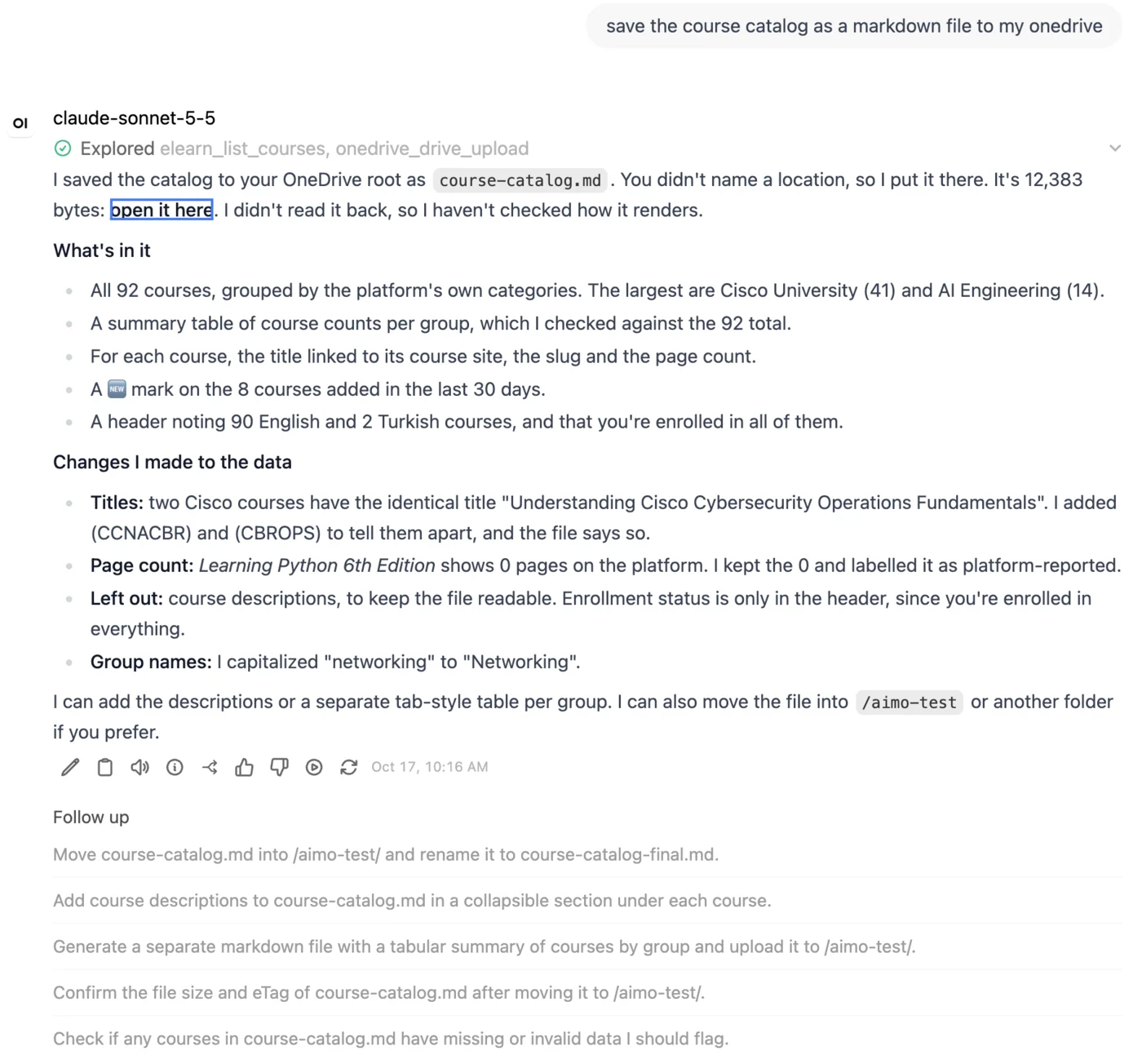
- The answer always comes from the model you picked. The task model writes only the title, the tags, the Follow up suggestions under an answer and the search queries.
- The conversation’s text is sent to the task model. If it runs at another provider than the model you picked, your conversation reaches both. Your administrator decides which model that is.
- The requests are yours. They are made under your name, in the same session, and count towards your limits like any other.
- You can switch two of them off for yourself: Follow-Up Auto-Generation and Chat Tags Auto-Generation under Settings → Interface.
The knowledge base shows the task model at work on two real chats: aimo’s task model.
For administrators
- The task model is External Task Model under Admin Panel → Settings → Interface, section Tasks. An id the gateway does not serve is silently replaced by the chat’s own model, so check a new chat’s requests on the console’s Activity page after a change. Pick a model that does not reason before answering: a reasoning model can spend its whole allowance thinking and return an empty title.
- The suggested model for a new chat is set on the platform, per model profile, with a platform-wide fallback; it allows and blocks nothing.
- The picker is fetched with the workspace’s own key, so it shows that key’s view of the catalogue. A tighter profile on a person or team is enforced when they send.