Set up a sweep
Setting up a sweep on Bench: endpoints and models, the tests, repeats and other settings, what runs when you press Start, and following its progress.
Checked against the running product on 22 November 2026
A sweep is one run: the models you tick, on the endpoints you tick, through the tests you choose, each test repeated a number of times. You set it up, start it and watch it on Bench. This page goes through the four cards of that page in order, then what happens when you press Start.
The line under the Bench heading says who the sweep will run as: your address, your key’s prefix and your model profile. If you have no usable key yet, it asks you to paste one on My key first, and the model list stays empty until you do.
One run for everything you compare
Put every provider you want to compare into one sweep. A face-off is computed from a single run, and only one run guarantees that every provider met the same tests and the same settings, measured close together in time. Two sweeps started at different times also measure whatever changed in between, such as a provider getting busier.
Endpoints and models
The Providers card lists the endpoints this installation lets you measure. Tick Bosphorus (platform gateway): the gateway as every client reaches it. Some installations list a second Bosphorus endpoint that reaches the same gateway without passing through its front door; ticking both measures what the front door adds.
Choose Load models. Each ticked endpoint is asked for its model list there and then, on your key, so the list holds only the models your model profile allows. An endpoint that cannot be listed is named beside the button with the reason, rather than leaving the list silently short.
In the Models card:
- Type in the filter to narrow the list, by part of a name (
deepseek) or by a provider prefix (NV/). - Tick one row per provider for the model you want to compare. Each row shows the model id, its endpoint, its type, its context window and the capabilities the platform reports for it. not reported means that nothing was reported, which is not the same as “cannot”.
- Select all shown ticks every row the filter leaves; Clear unticks everything.
The face-off groups rows into one model by name, once the provider prefix is removed. Where two providers spell the name slightly differently — one adds an organisation in front, or writes a separator or a capital letter differently — ticking both rows in the same run tells it to compare them as one model, and the face-off says that the equivalence was your choice.
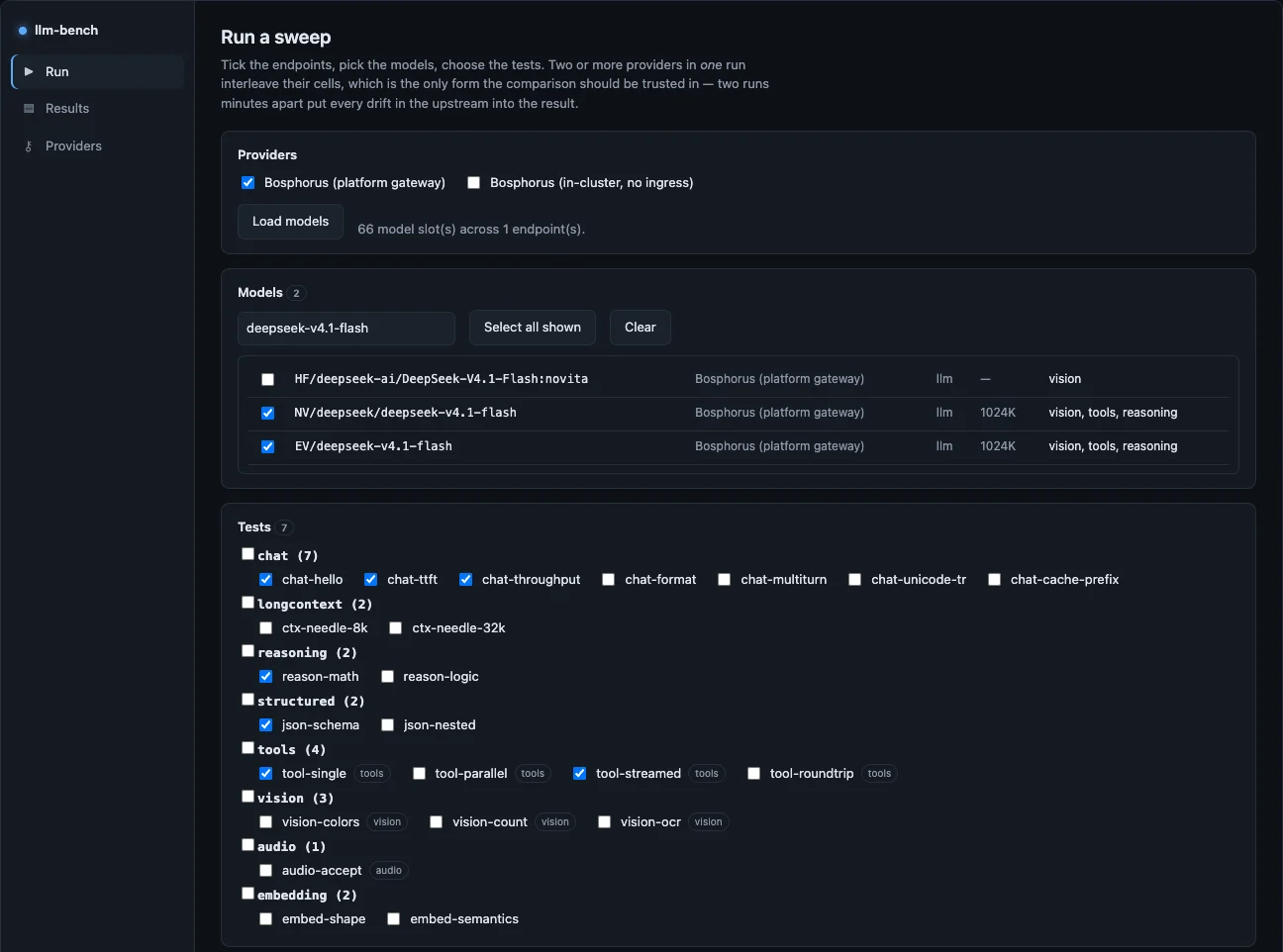
Tests
The Tests card holds 23 tests in eight groups. Ticking a group’s heading ticks every test in
it; the tests of the chat group are ticked when the page opens. Hover over a test to see what
it measures.
| Group | Tests | What they check |
|---|---|---|
chat |
7 | A minimal round trip, time to first token, sustained generation speed, an exact output format, recall across turns, Turkish characters surviving the round trip, and whether a repeated prefix is read from a prompt cache |
longcontext |
2 | Finding one sentence in a prompt of about 8,000 and about 32,000 tokens |
reasoning |
2 | Multi-step arithmetic and a deduction with one forced answer |
structured |
2 | Whether a JSON schema is enforced, for a flat and for a nested object |
tools |
4 | A single tool call, two calls in one turn, a tool call over a stream, and a tool result used in the answer |
vision |
3 | Reading coloured quadrants, counting shapes, reading a printed code |
audio |
1 | Whether audio input is accepted |
embedding |
2 | The shape of the vectors, and whether related text lands closer than unrelated text |
Not every test runs on every model, and each skip is stated with its reason rather than counted as a failure:
- Embedding tests run only on embedding models, and the other tests never do.
- The long-context tests are skipped on a model whose context window is known to be too small for them.
- Tests marked
tools,visionoraudioneed that capability. When the endpoint does not confirm it for the model, the test is skipped with… not confirmed … — enable "probe unconfirmed" to try.
Settings
| Setting | Starts at | What it does |
|---|---|---|
| repeats | 3 | How many times each test is sent to each model. Keep it at 3 or more: below that, the face-off withholds every claim that a difference is real |
| concurrency | 2 | How many cells run at the same time. Higher finishes sooner, with more of your requests in flight at once |
| timeout (s) | 120 | How long one request may take before it counts as an error |
| budget scale | 1 | Multiplies every test’s output cap. Raise it for a reasoning model that runs out of room before it answers |
| probe unconfirmed | off | Runs the capability tests even where the endpoint does not confirm the capability. Cells run this way are marked as unconfirmed in the results |
By default the service runs at most 10 repeats, 4 cells at once and a 300-second timeout, and it keeps the budget scale between 0.25 and 8. The fields accept larger numbers; a value beyond a limit is brought within it when the sweep starts, without a message. The other limits, and what a sweep costs, are on What it measures and costs.
What happens when you press Start
- Your key is checked with the gateway again. If it is refused, nothing runs, and the reason is shown.
- The selection is checked: at least one model and one test, and no more than 400 cells by default. A cell is one model row with one test.
- The run is saved with an id such as
mw0sl5y8, as running. - The cells that cannot run are set aside, each with its reason.
- The cells run, as many at a time as concurrency says, in the order of the model list.
The repeats of one cell run one after another. Every request carries the session
bench-<run id>and the tagllm-bench, so the platform files it with the run. - The results are saved when the last cell finishes.
Two safeguards act while it runs. If the gateway refuses a model under your model profile, that cell and every later cell of the model are skipped, and no further request is sent for it. If one model on one endpoint fails in exactly the same way six times, across at least two of the tests that need no special capability — a request rejected as invalid, or a provider that cannot be reached — the bench stops sending it requests for the rest of the sweep, rather than spend your tokens on an answer that will not change.
Following progress
A progress card appears under the settings: Running…, the cells done out of the cells planned, a bar, and the log. The cells table fills in as each cell finishes, with ✓ when every attempt passed, ✗ when one failed its check, and ! when one ended in an error; its last column says why. Skipped cells are listed under the table with their reasons.
| Log line | Means |
|---|---|
running as … · key gpk_… · model profile "…" |
Who the sweep runs as |
N cell(s) to run, M skipped |
The plan, after the skips |
[3/14] ok … 3/3 |
A cell finished: ok, xx (a check failed) or !! (an error), then how many of its attempts passed |
… not allowed by your model profile |
The gateway refused this model for you |
giving up on … — N consecutive identical failures: … |
The safeguard above; the provider’s own message follows |
saved — open /runs/<id> for the results and a face-off |
Finished |
You can leave the page, or close the browser. The sweep runs on the server, not in your browser: open Bench again, from any window where you are signed in, and its progress and log reappear. You can run one sweep at a time.
Stop starts nothing new: the requests already in flight are allowed to finish, and the run is saved with what completed. Its status is cancelled, and its face-off is marked as stopped early.
When the sweep finishes, the card below the log names the saved run. The command line and the note about a desktop app printed beneath it are written for the desktop edition of the benchmark: on the web, open the run under Runs & face-off — see Reading the results.
Two more texts inside Bench are also written for the desktop edition. The line under Run a sweep says that providers in one run interleave their cells; they do not — the cells run in the order of the model list, as in step 5 above. And the Providers view, beside Run and Results, is a read-only list of the endpoints, whose note about the Electron app’s config file does not apply on the web.