Modes and approvals
How an aimo chat may act: the four modes, approval cards, undo and review, Workspace Trust, and the project instructions a repository brings.
For aimo 1.4.8 · checked against that release on 22 November 2026
aimo asks before it changes anything. How much it may do without asking is set per chat, by its mode, and a few rules hold in every mode.
The four modes
Every chat has a mode, shown on the button under the message box. Shift+Tab moves to the next
one, /mode or AIMO: Set the Chat Mode picks one, and aimo.defaultMode sets where a new chat
starts.
| Mode | What aimo may do |
|---|---|
| Ask | Answer and read the workspace. Nothing that changes anything is offered or run |
| Plan | Read, then write a plan: the goal, numbered steps naming the files, the risks. Implement the plan under it switches the chat to Agent and carries it out |
| Agent | Do the work, asking before every change. The default |
| Auto-edit | Edit files in the workspace without asking. Commands and tool-server calls that change something still ask, and commands get no values from your vault |
The mode is read live: switching to Ask in the middle of an answer stops the next change.
What no mode changes
- A command that is about to receive values from your vault is asked about every time, even after Allow all.
- In a folder outside Workspace Trust, every action is asked about.
- Auto-edit and
aimo.autoApproveToolshand commands no vault values at all. Auto-edit writes files nobody reviewed — scripts, hooks, tasks — and a harmless-looking command could run them; so a value goes only to a command somebody looked at.
Approval cards
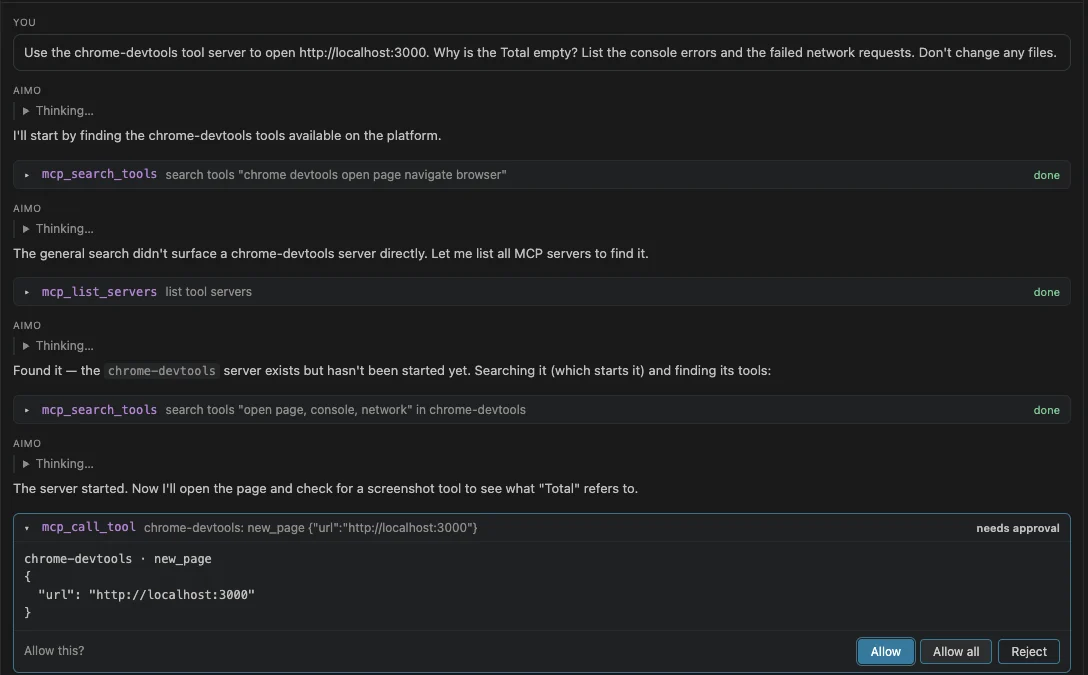
When the agent wants to change something, the chat shows a card with exactly what it would do:
- An edit shows the diff; Open diff opens it in VS Code’s diff editor.
- A command shows the command it would run.
- A tool-server call shows the server, the tool and every argument of the call.
Allow runs that one action. Allow all allows every action for the rest of this turn, except what is always asked about. Reject tells the model that you said no: it does not try the action again, and asks you how to go on.
aimo.autoApproveTools skips the cards altogether. It is off by default, it can be set only in
your own user settings, and it is ignored in Restricted Mode.
Undo and review
aimo keeps a checkpoint of every file a turn changes.
- Undo on the notice that follows a turn,
/undo, or AIMO: Undo the Last Turn’s File Changes puts those files back as they were. - AIMO: Review the Last Turn’s File Changes goes through them as diffs.
- Rewind on an earlier message offers to put back the files of that turn and every later one, newest first. Checkpoints are kept for the last ten turns; a file whose checkpoint is gone is named rather than skipped silently.
Undo covers files only. What a command did — a package it installed, a request it sent, a database it changed — is not undone.
Workspace Trust and Restricted Mode
VS Code asks whether you trust the authors of a folder. aimo follows the answer:
- In Restricted Mode nothing runs without being asked,
aimo.autoApproveToolsis ignored, no vault value is handed out, project instructions are not used, and no tool server runs on this machine. - A chat on a folder the window did not open counts as outside Workspace Trust in the same way.
Project instructions
A repository may carry instructions for AI agents: AGENTS.md, CLAUDE.md,
.github/copilot-instructions.md or .aimo/instructions.md. They are written by whoever wrote the
repository, so aimo asks before using them — Use them, Show them, Not for this folder —
and asks again whenever one of them changes.
- Once accepted, they go with every request on that folder, below aimo’s own rules, which they cannot override. The message box names them.
/instructionsor AIMO: Project Instructions (AGENTS.md, CLAUDE.md)… changes your answer.aimo.projectInstructionsMaxCharscaps how much of them is sent (20,000 characters by default); a longer file is cut, and the chat says so.aimo.projectInstructionsset tooffnever uses them.- They are read only from inside the folder: a link that leads out of it, or to a credential file, is not followed.