Security and your data
Where aimo sends what, what it keeps on your machine, what a repository you open cannot change, and what your organisation's administrators can see.
For aimo 1.4.8 · checked against that release on 22 November 2026
aimo runs in folders somebody else may have written, and it handles your identity, your keys and your code. This page says where each of them goes.
Where your data goes
On your organisation’s platform:
- Your chats — messages, attached files and images, tool output, the conversation so far — go to your organisation’s gateway, which checks them against its policies and passes them to the model your profile allows. Nothing goes to a model provider directly.
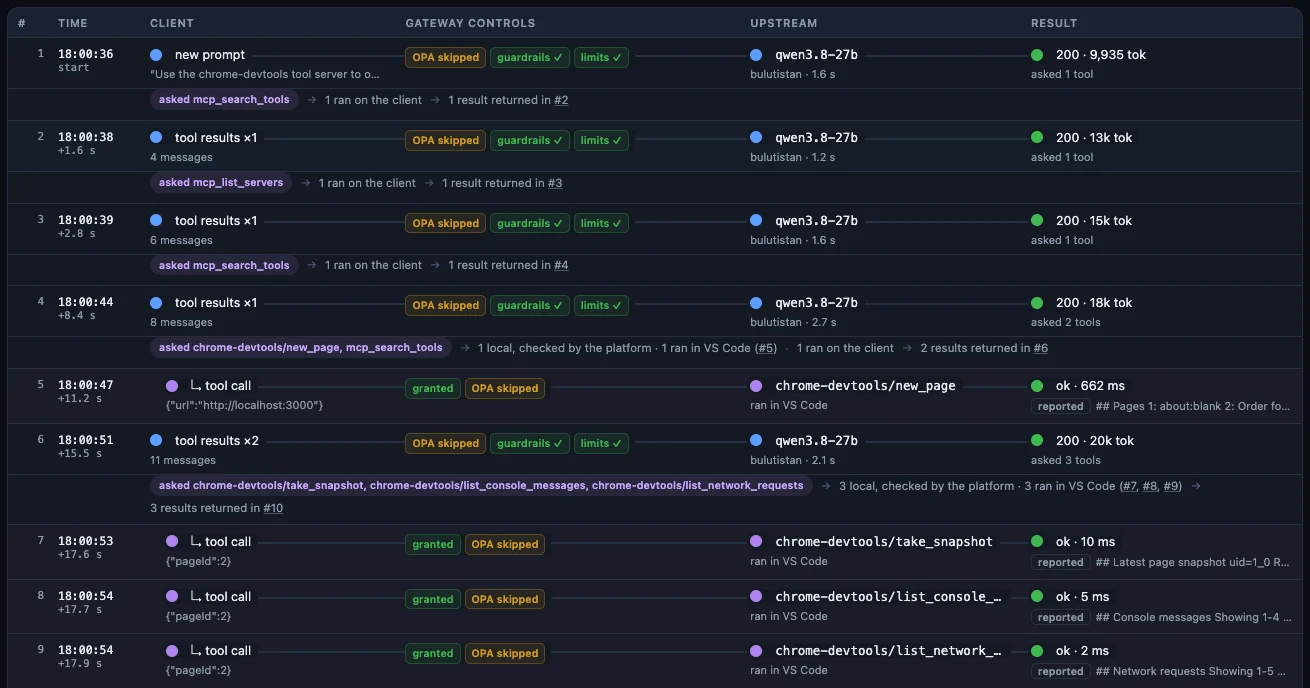
- Calls to the platform’s tool servers go to the gateway too, which calls the server. aimo never learns a server’s address or credentials.
- Calls to tool servers on this machine go straight to that server, but only after the platform has checked and recorded each one.
- Your vault values go from OpenBao to the command, terminal or tool server that uses them — never into the chat, and never to the model.
- Your sign-in happens with your organisation’s identity provider, in your browser.
In direct mode: your chats go straight from VS Code to the provider you chose, with your key, and only there. The platform hears nothing from that window. See Your own API key.
What stays on this machine
| What | Where |
|---|---|
| Your platform key and the sign-in’s tokens | VS Code’s secret storage |
| Your provider API key, in direct mode | VS Code’s secret storage, tied to that provider’s address |
| Secrets for your own tool servers | VS Code’s secret storage |
| Your chats | VS Code’s storage for the workspace: an index, and a file per chat. Images are not kept |
| The MCP traffic log, when on | This profile’s storage, encrypted |
| Your answers to consent questions — project instructions, vault mappings, tool servers | VS Code’s storage for the extension |
No value from your vault is stored by aimo.
What a repository cannot do
Opening a project must not be able to turn aimo against you, so:
- It cannot redirect your sign-in, your keys or your secrets. The settings that decide where
they go — the gateway and vault addresses, the sign-in settings, direct mode’s provider, endpoint
and model, the tool servers on this machine — can be set only in your own user settings, never
in a repository’s
.vscode/settings.json. - It cannot switch the approvals off.
aimo.autoApproveTools,aimo.defaultModeandaimo.protectSensitiveFilesare user-only too. - It cannot raise your spend in direct mode. The step, token and tool budgets are read from your own settings there.
- Its instructions for AI agents and its vault mappings are used only after you accept them, and are asked about again when they change.
- It cannot reach outside its folder. Every path is judged by where it really points, so a link inside the workspace to a file elsewhere is outside.
- A folder you do not trust gets nothing: in Restricted Mode, or in a folder outside Workspace Trust, every action is asked about, no vault value is handed out, project instructions are not used and nothing runs on this machine.
The full list of user-only settings is in Settings.
Credentials in your workspace
Files that usually hold credentials — .env, private keys, cloud and cluster credentials,
*.tfvars and the like — are read only after you agree, and stay out of search results; see
What the agent can do. The better home for such values is
your vault, where commands can use them and the model never sees them.
What masking can and cannot do
aimo replaces a vault value with [vault:NAME] wherever a command prints it as it is, and a secret
a tool server on this machine echoes with [secret:<id>], before the model sees the text. Masking
recognises the value; it cannot recognise something a command has computed from it — a hash, an
encrypted form, a value cut in two. What protects a secret in the end is the approval: a command
that receives vault values is asked about every time, so a person reads it before it runs.
What your organisation sees
On the platform, every model request and every tool-server call is recorded under your name. You see your own on the platform’s activity page, each chat grouped as one session; other people’s are shown only to the administrators your organisation allows to see everyone’s traffic, and your usage counts towards the totals on its usage pages. The tool servers on this machine are recorded there too, call by call, with what the platform checked. An MCP traffic log segment reaches the platform only if you upload it.
In direct mode the platform records nothing, because it is not involved.