Tool servers on this machine
Run MCP tool servers where you work — the browser recipes, CodeGraph and your own servers: consent, secrets, approvals and the platform's check.
For aimo 1.4.8 · checked against that release on 22 November 2026
Some tools have to run where you work: a browser the agent drives, an index of the code in front
of you, a tool server of your own. Switch aimo.mcp.local.enabled on — it is off by default, and
takes effect at once — and they are listed in the Tool Servers view beside the platform’s.
What can run here
- Recipes your organisation registers. Chrome DevTools (
chrome-devtools-mcp1.11.0) and Playwright (@playwright/mcp0.0.83) are started withnpxat the version fixed in aimo itself, so Node.js must be installed; the platform never sends a command line. Their options are yours, inaimo.mcp.local.recipeOptions:headless,isolated(on by default, so every window gets its own browser), andbrowserUrlfor Chrome DevTools orbrowserfor Playwright. The first start on each machine — and on each SSH host or container — downloads the package before the server starts, with up to five minutes for that, and Tool Servers shows the server as downloading meanwhile. Later starts run from npm’s cache, without asking the npm registry. - CodeGraph, when your organisation registers it, answers questions about the code in the chat’s folder from CodeGraph’s own index of that folder.
- Your own servers, in
aimo.mcp.local.servers.
The knowledge base walks through Chrome DevTools from the registration on the platform to the answer in the chat.
CodeGraph
- aimo runs exactly CodeGraph 1.5.0, installed with CodeGraph’s own installer — aimo never installs it. macOS and Linux for now.
- It runs in a process of its own, with CodeGraph’s telemetry and update checks switched off, and without its shared background service.
- Indexing is your decision, folder by folder. A folder that already has a CodeGraph index counts as decided. Otherwise aimo asks once whether to index it, and AIMO: Index This Repository with CodeGraph indexes it on request, in the background. Until a folder is indexed, CodeGraph is listed with its state and offers no tools.
- It obeys the same file rules as the agent’s own tools: files outside the folder and credential files are removed from its answers, and the answer says so. Another repository on your machine cannot be asked.
Your own servers
Each server has a name — lower-case letters, digits and - — and is either a command (stdio) or
an address (http). The model sees it as own_<name>.
{
  "aimo.mcp.local.enabled": true,
  "aimo.mcp.local.servers": {
    "notes": { "type": "stdio", "command": "node", "args": ["/opt/tools/notes-mcp.js"] },
    "search": {
      "type": "http",
      "url": "https://mcp.corp.example/mcp",
      "headers": { "Authorization": "Bearer ${secret:search-token}" }
    }
  }
}
| Field | Meaning |
|---|---|
type |
stdio for a command, http for an address |
command, args |
The program and its arguments. The program is found on your PATH, never inside the workspace |
cwd |
The folder it runs in. Without it, the server runs in a private folder of its own, not in your workspace |
env |
Environment variables for it |
url, headers |
For http: an https:// address, or http:// on this machine only |
description |
What it is for, shown in the view |
approval |
readOnlyHint, the default: tools the server marks read-only run without asking. always: every call is asked about |
timeoutSeconds |
How long one call may take, from 1 to 600; 120 by default |
disabled |
true keeps the entry but does not run it |
${workspaceFolder} in cwd, args or env names the chat’s folder.
It asks before it runs
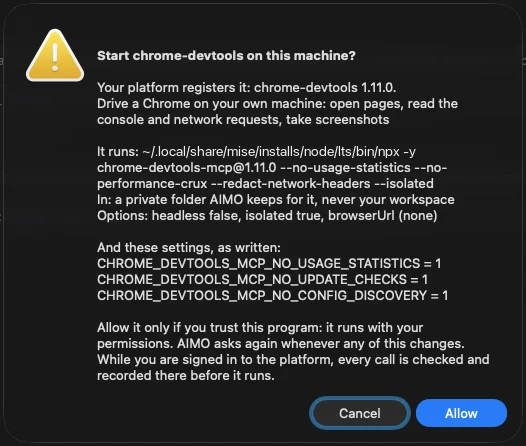
Before a server first runs on this machine, aimo shows exactly what it is about to start: the command it found, its arguments, its folder, the name of every secret or vault value it receives — never the secret itself — and every plain setting as written. It asks again whenever any of that changes, and again on another machine: an SSH host or a container is asked separately.
Since aimo 1.4.2 the two browser recipes start from npm’s cache, which their settings show as
npm_config_prefer_offline=true; after updating from an earlier version, each asks once more.
Secrets are named, never written
${secret:<id>}names a value stored with AIMO: Set Local Server Secret, in VS Code’s secret storage on this machine. AIMO: Remove Local Server Secret deletes one.${vault:me/<path>#<key>}names a value in your vault; a team vault (team/<team>/…) and your tool-server variables (mcp/<server>#<VARIABLE>) work too.- A plain value is refused where a secret belongs: for
Authorization,CookieorX-Api-Key, for any name containingTOKEN,SECRET,PASSWORDorAPI_KEYand their kind, for an address with a password in it, and for anhttpaddress with a key in its query. - A secret the server echoes back reaches the model as
[secret:<id>]or[vault:NAME]. - Some environment variables cannot be set at all, because they change how a program loads,
installs or trusts code:
PATH,NODE_OPTIONS, proxy and certificate variables, and theNPM_,NODE_,PUPPETEER_,PLAYWRIGHT_prefixes and their kind.
For a registered recipe, aimo.mcp.local.env maps the variables it is known to read to places in
your vault.
Approvals
- The approval card shows every argument of the call, in full.
- A server that receives secrets is asked about every time, even after Allow all, for each of its tools.
- It gets none of its secrets with
aimo.autoApproveToolson, in a folder outside Workspace Trust, or in Auto-edit when it runs code from the chat’s folder.
While you are signed in, the platform checks every call
- Before a call runs, aimo asks the platform: the call is recorded under your name and checked by your organisation’s policies, and the platform is told afterwards how it ended.
- If the platform refuses it, nobody is asked and it does not run; the refusal is the tool’s answer to the model.
- If the platform cannot be reached, tools on this machine do not run.
- Your organisation may switch your own servers off while you are signed in. A call to one then answers that your organisation does not allow your own tool servers.
In direct mode your own servers work too, without the platform’s check, since there is no platform — but not while a platform key is on this machine: then they run only in a window on the platform, under its check. In Restricted Mode nothing runs on this machine.
Looking after them
On each server in Tool Servers:
- Restart Local Tool Server starts it again. A command server that stops five times within ten minutes is no longer started until you restart it.
- Forget Local Tool Server Consent forgets that you allowed it, so it asks again.
- Index This Repository with CodeGraph appears on a CodeGraph server whose folder is not indexed yet.
What passes between aimo and these servers can be kept in an encrypted log — see The MCP traffic log.