voimo, narration and transcripts
voimo turns text into speech and recordings into timed transcripts: what it is and is not, where things are, a quick start, and these pages.
Checked against the running product on 22 November 2026
voimo is the speech application of Bosphorus. It turns text into speech, a narration, and recordings into text, a transcript with a time on every line. What you make is kept in a private library that only you can open. A transcript, never the audio, can be published to a shared library, where colleagues find it by its words.
voimo is an application of its own, with its own address, next to aimo. It is installed where your organisation chose to offer it; your administrator gives you the address.
What voimo is, and is not
- It works on files, as jobs. You hand it a text or a recording, it does the work in the background, and the result waits in your library. To dictate into a chat or have an answer read aloud, aimo has its own dictation and read-aloud.
- It runs as you. At your first sign-in voimo obtains a platform key of your own, made for voimo alone. Every request it makes for you goes through your organisation’s gateway with that key, so it counts against your own limits and appears under your name in the platform’s audit trail.
- It uses your installation’s speech models. In voimo’s standard configuration these are models that run on your organisation’s own servers; which models they are is your administrator’s choice.
- It is not a transcript editor. You can rename a recording and tag it. To correct the words, download the transcript and edit your copy.
- It does not tell speakers apart. A transcript is timed text, with no names of who spoke.
- It shares nothing on its own. Your narrations, recordings and transcripts are yours alone. Only a transcript you publish is shared, and the recording itself never is.
- It asks for your consent first. Before your first job you read its privacy notice and give your consent. Withdrawing it erases everything you hold in voimo, in one step.
Where things are
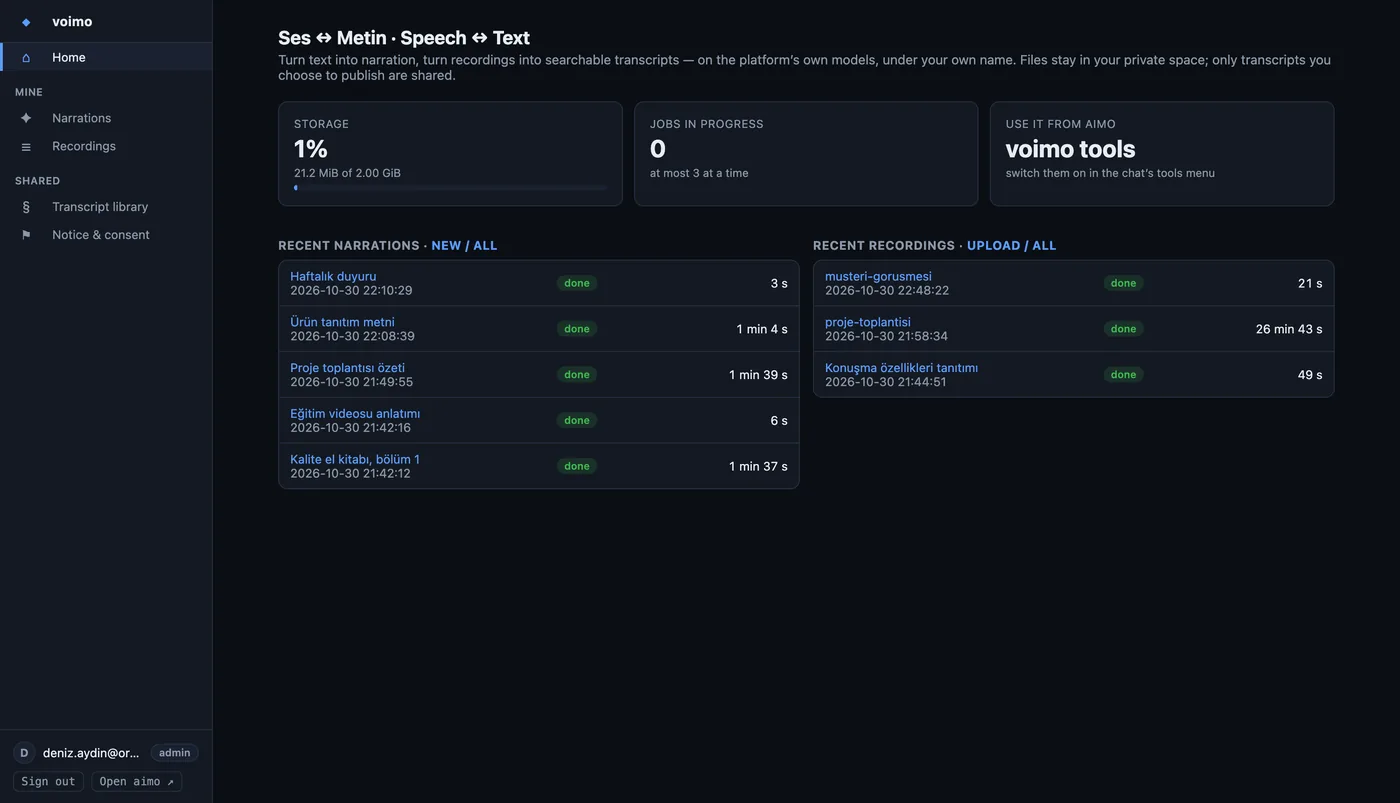
| In the sidebar | What it shows |
|---|---|
| Home | Your storage use, your jobs in progress, and your five most recent narrations and recordings |
| Narrations, under Mine | The form for a new narration, and every narration of yours |
| Recordings, under Mine | The upload form, and every recording of yours |
| My voice, under Mine | Record your own voice for narrations, share it with colleagues, or delete it |
| Transcript library, under Shared | Published transcripts, which everyone who can sign in to voimo can search and read |
| Notice & consent, under Shared | The privacy notice, your consent, and withdrawing it |
The foot of the sidebar shows the address you are signed in with and your role, member or admin, with Sign out, and Open aimo ↗ where your installation links to aimo. ◆ at the top folds the sidebar into a narrow rail.
The labels are in English. The main buttons and the privacy notice carry Turkish and English together, for example Seslendir · Narrate. Times are shown in your organisation’s time zone.
Quick start
- Open voimo at your organisation’s address, for example
https://voimo.corp.example, and sign in with your work account — see Sign in and consent. - Give your consent. Open Notice & consent, read the notice and press Okudum, açık rıza veriyorum · I have read it and consent.
- To make audio, open Narrations, paste your text and press Seslendir · Narrate — see Narrations.
- To transcribe, open Recordings, choose the file, tick the confirmation and press Yükle ve yazıya dök · Upload and transcribe — see Recordings and transcripts.
- Wait for done. The page refreshes itself while the job runs — see The life of a job. Then play it, download it or, for a transcript, publish it.
Where your organisation offers it, the same work can be asked for in an aimo chat: switch on voimo’s tools and the model narrates or transcribes for you and answers with a link — see From aimo and from code.
This documentation
| Section | Pages |
|---|---|
| Get started | This page, Sign in and consent |
| Working in voimo | Narrations, My voice, Recordings and transcripts, The life of a job, The shared library |
| Beyond the web page | From aimo and from code, Limits, What is recorded |
| Administration and help | Administration, Troubleshooting |
If your organisation does not run Bosphorus yet, see the workspaces or contact us.