My voice
Recording your own voice in voimo: the consent, the spoken statement and the sample, using and sharing the voice, its label, and deleting it.
Checked against the running product on 22 November 2026
On My voice you can record your own voice once, and voimo then reads your texts in it. Only you can use it, unless you name colleagues, and every file made with it says that it is a synthetic voice. This page is about recording, using and deleting it.
Before you start
- Your installation must have opened it. Recording a person’s voice is processing of biometric data, so it waits until your organisation’s data-protection officer has approved the consent wording. Until then the page shows a banner beginning TASLAK and says Recording your voice opens once it is signed off. Administrators can try the flow meanwhile; a voice they record is marked TEST.
- You have signed in and accepted voimo’s notice, as for any job — see Sign in and consent.
- A microphone, and a quiet room. You record in the browser, from your own microphone; there is no way to upload a file instead. The browser asks once for permission to use the microphone.
Recording your voice
- Read the consent text and agree to it. Under Açık rıza metni · Explicit consent the text is shown in Turkish and English. It is separate from voimo’s notice and covers only your voice. Enter Your full name, as you will say it, choose the Language of the recordings, Türkçe or English, tick Okudum, açık rıza veriyorum · I have read it and give my explicit consent, and press Başla · Start.
- Say the consent statement. Step 1 of 2 shows one sentence with your name in it. Press ● Kaydet · Record, read the sentence aloud, and press ■ Bitir · Stop. voimo has it transcribed, and accepts it when the transcript matches the sentence and contains your name.
- Read the sample. Step 2 of 2 shows a paragraph. Record it the same way, at your normal pace, for 15 to 60 seconds, within ten minutes of the statement.
- Done. The page says Your voice is ready. It is now in the Ses · Voice menu on Narrations, labelled my voice.
Vazgeç · Cancel stops an enrolment at any step; what was recorded for it is deleted.
When it is not recognised
A statement or sample that was not recognised is not an error: the page says Not recognised, shows what the speech model heard, and you record it again.
- Speak at a normal pace, close to the microphone, without other voices in the room.
- Say your name exactly as you entered it. A statement whose words match but whose name was not heard is not accepted.
- Five tries for the statement. After the fifth unrecognised one the enrolment ends; start again.
- The statement takes 2 to 60 seconds, the sample 15 to 60. A recording outside those lengths is refused before it is checked.
Using your voice
Choose it in the Ses · Voice menu on Narrations, or ask for it in an aimo chat — the
list_voices tool lists it, see From aimo and from code.
voimo reads your text in it as it reads any voice.
Every narration made with it is labelled. Its page shows Sentetik ses: Ayşe Yılmaz · Synthetic voice of Ayşe Yılmaz (with your name), the list marks it sentetik ses, the downloaded file’s name ends in Sentetik ses and your name, and the words are written into the audio file itself. The label stays with the file wherever it goes.
Nobody else can use it. Anyone who asks for it, in voimo, in aimo or at the platform’s gateway directly, is refused, unless you have named them below.
Sharing it with colleagues
Under Colleagues who may use this voice, enter their addresses, separated by commas or spaces, and press Paylaşımı kaydet · Save sharing. Leave the box empty to keep the voice to yourself.
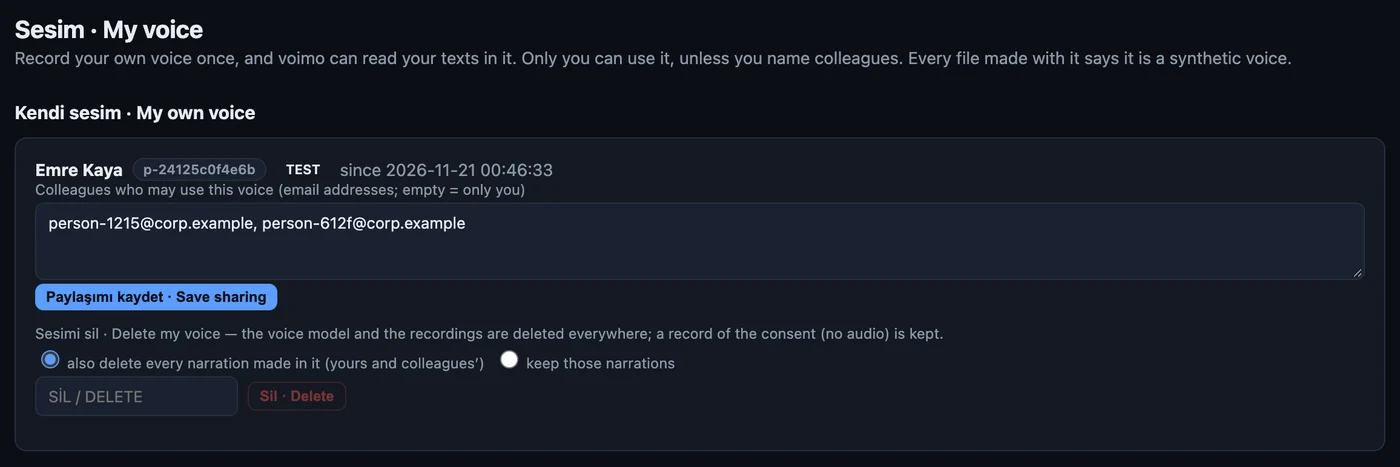
- Named people only, up to 50, at addresses of your organisation. There is no setting that shares your voice with everyone.
- They can use it, not change it. It appears in their voice menu, labelled shared; they cannot share it further or delete it, and their narrations carry your name in the label.
- Removing someone takes effect at once for their next narration.
Deleting your voice
Under Sesimi sil · Delete my voice, choose what happens to the narrations made in your voice:
- also delete every narration made in it, your own and your colleagues’, or
- keep those narrations, still labelled.
Type SİL or DELETE and press Sil · Delete. Your voice is removed from the speech servers and can no longer be chosen, and the recordings of your statement and sample are deleted. A record of your consent is kept, without any audio: when you agreed, to which version of the text, and what the speech model heard of your statement. You can record a new voice afterwards.
Withdrawing your consent to voimo as a whole, with Rızamı geri çek ve verilerimi sil, deletes your voice in the same way, and every narration made in it — see What is recorded.
Voice talent
Your administrators can also enrol a voice talent, a professional speaker under a written contract that covers synthetic speech. The talent reads the same statement and sample in front of them, and the contract is recorded with the voice. Such a voice appears in the voice menu as voice talent, for everyone or for named people, as the contract allows, and its narrations carry the talent’s name in their label.
What aimo can and cannot do
An aimo chat can use a voice you may use, by its name. It cannot record, clone, share or delete one: those are yours to do on this page. The platform also refuses a voice clip sent to it directly to imitate someone; a voice reaches the speech servers only through this page.