Narrations
Text to speech in voimo: the form, choosing a voice, the languages, what you can feed it, how long text is read, and downloading the audio.
Checked against the running product on 22 November 2026
A narration is a text turned into an audio file. You write or paste the text on the Narrations page, voimo reads it aloud in the voice you choose, and the file is kept in your private library until you delete it.
Making a narration
On Narrations, fill in the form and press Seslendir · Narrate.
| Field | What to enter |
|---|---|
| Title (optional) | Up to 200 characters. Left empty, the first words of the text become the title |
| Text | The text to read, in Turkish or English. A counter under the box shows how many characters you have used of the limit, 50,000 by default |
| Ses · Voice | The voice to read with — see below. Shown when you have more than one to choose from |
| Format | MP3, the default, Ogg Opus or WAV |
| Speed | 0.8×, 0.9×, 1×, 1.1× or 1.25×; 1× by default |
The narration’s page opens at once, while the audio is made. If the form shows Accept the information notice first or Sign out and in once to link your speech key instead, see Sign in and consent.
Choosing a voice
The Ses · Voice menu lists the voices you may use, the first one chosen by default:
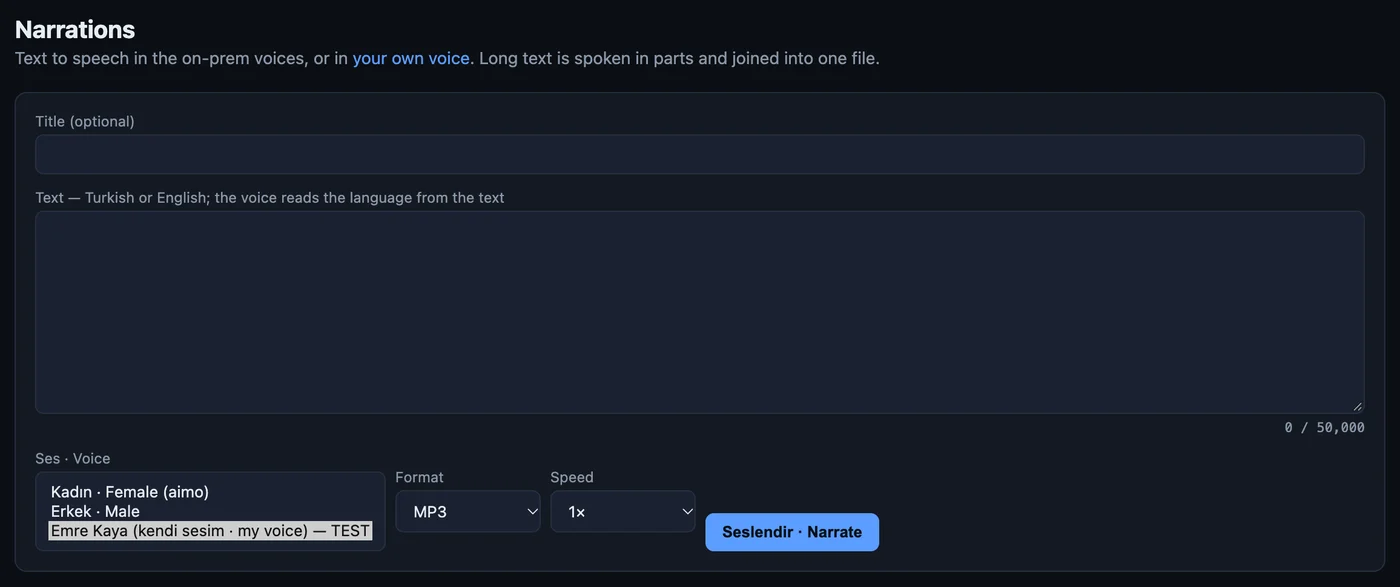
- The voices your installation offers. In voimo’s standard configuration there are two, a female voice named aimo and a male one. They are made by the speech model; no person’s voice is behind them.
- Your own voice, labelled my voice, once you have recorded it on My voice — see My voice.
- A colleague’s voice they shared with you, labelled shared, and voice-talent voices your administrators enrolled, where your installation has them.
The voice’s name is on every narration’s page.
A narration in a person’s voice says so. For a voice recorded by Ayşe Yılmaz, its page shows Sentetik ses: Ayşe Yılmaz · Synthetic voice of Ayşe Yılmaz, the list marks it sentetik ses, the downloaded file’s name ends in Sentetik ses Ayşe Yılmaz, and the same words are written into the file itself. Share such a file only with that label.
The languages
The form takes Turkish or English, and there is nothing to set: in the form’s own words, the voice reads the language from the text. The speech model behind it reads other languages too; whether your installation supports them is a question for your administrator.
What you can feed it
- Plain text, typed or pasted. voimo reads the words as running prose. Line breaks and blank lines are joined into single spaces, so a heading or a list item without a full stop is read straight on into the next line.
- Nothing is formatted away. voimo has no markup of its own and does not interpret one. For a document in another format, a PDF or a Word file, copy its text into the form.
- From aimo, a text written in the chat, or a
.txtor.mdfile you attached there. A Markdown file is read as it stands; voimo does not remove its formatting marks first — see From aimo and from code.
How long text is read
One request to the speech model returns at most about 30 seconds of audio. So voimo cuts your text into parts of up to about 400 characters, at sentence ends where it can, then at commas, semicolons or colons, then at a space. It speaks the parts one after another and joins them into one file. The page shows the progress as N / M parts.
A part that comes back as long as one request can return was probably cut short, so voimo speaks it again in two halves; a sentence is not silently lost at the end of a part.
The narration’s page
| Part | What it shows |
|---|---|
| Under the title | The status, then the format, the speed, the voice and the number of characters |
| While it runs | A progress bar, N / M parts. The page refreshes itself every few seconds |
| If it failed | The reason, in red — see The life of a job |
| Once it is done | A player, ⬇ Download, the length and the file size |
| Text | The full text that was read |
| At the foot | Created, Finished and Source: web for this page, mcp for a text sent from an aimo chat, aimo-file for a file attached in aimo |
Delete removes the narration and its audio, after you confirm.
Downloading the audio
⬇ Download saves the file in the format you chose, named after the narration’s title; the player plays the same file in the page.
| Format | What you get |
|---|---|
| MP3 | A compact mono file that plays almost anywhere |
| Ogg Opus | A mono file, smaller still for the same speech |
| WAV | Uncompressed audio, by far the largest |
The audio counts against your storage in voimo, so a WAV narration fills it fastest — see Limits.
Your narrations
The Mine list under the form shows every narration of yours, newest first, 25 to a page: the title, the status (with the part count while it runs), the length, the size and when it was created. A narration that did not come from this page carries its source as a badge. Use Older → to page back.